This is a read-only archive of malwareremoval.com. No new posts or registrations. Privacy Page
Malware Removal Forums

Questions on computer I picked up for free

45 min read

This thread's last reply is from September 23, 2008, 3:48 PM UTC. Software, malware, and removal-tool advice below may be out of date — treat specific steps and download links with caution.

Hi motoman ,

You have an infection in your outlook express misc mailbox,please delete any suspicious looking e-mails from there,the location is:

C:\Documents and Settings\Cherryhomes\Local Settings\Application Data\Identities\{C4A5DD2E-548B-46FE-81F8-928FD487E45D}\Microsoft\Outlook Express\misc..dbx


Delete bad files and/or folders
Use Explorer to navigate to and delete the following files and/or folders (if they are present):

Files:
C:\Program Files\Yahoo!\YPSR\Quarantine\ppq539.tmp


Folders:
C:\Program Files\Common Files\Real\Toolbar


Now just exit Explorer.

----------------------------------------------


  1. Please download Malwarebytes' Anti-Malware and save it to a convenient location.
  2. Double click on mbam-setup.exe to install it.
  3. Before clicking the Finish button, make sure that these 2 boxes are checked (ticked):
      Update Malwarebytes' Anti-Malware
      Launch Malwarebytes' Anti-Malware
  4. Malwarebytes' Anti-Malware will now check for updates. If your firewall prompts, please allow it. If you can't update it, select the Update tab. Under Update Mirror, select one of the websites and click on Check for Updates.
  5. Select the Scanner tab. Click on Perform full scan, then click on Scan.
  6. Leave the default options as it is and click on Start Scan.
  7. When done, you will be prompted. Click OK, then click on Show Results.
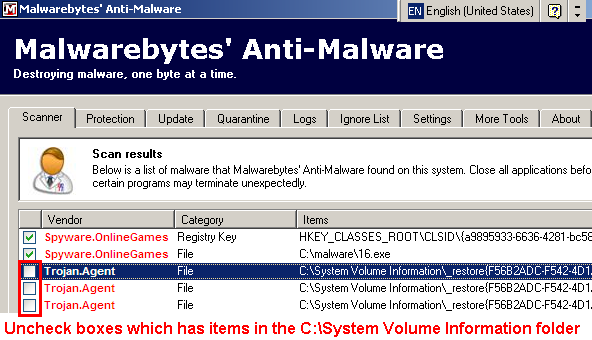
  8. Checked (ticked) all items except items in the C:\System Volume Information folder and click on Remove Selected.


  9. After it has removed the items, Notepad will open. Please post this log along with a fresh hjt log in your next reply. You can also find the log in the Logs tab. The bottom most log is the latest.
Here is the log from Malwarebytes' Anti-Malware

Malwarebytes' Anti-Malware 1.27
Database version: 1134
Windows 5.1.2600 Service Pack 2

9/11/2008 10:06:09 PM
mbam-log-2008-09-11 (22-06-09).txt

Scan type: Full Scan (C:\|)
Objects scanned: 86284
Time elapsed: 34 minute(s), 10 second(s)

Memory Processes Infected: 0
Memory Modules Infected: 0
Registry Keys Infected: 0
Registry Values Infected: 0
Registry Data Items Infected: 0
Folders Infected: 0
Files Infected: 1

Memory Processes Infected:
(No malicious items detected)

Memory Modules Infected:
(No malicious items detected)

Registry Keys Infected:
(No malicious items detected)

Registry Values Infected:
(No malicious items detected)

Registry Data Items Infected:
(No malicious items detected)

Folders Infected:
(No malicious items detected)

Files Infected:
C:\winamp281_std.exe (Trojan.Agent) -> Quarantined and deleted successfully.
And the fresh hijack this log:

Logfile of Trend Micro HijackThis v2.0.2
Scan saved at 10:10:33 PM, on 9/11/2008
Platform: Windows XP SP2 (WinNT 5.01.2600)
MSIE: Internet Explorer v6.00 SP2 (6.00.2900.2180)
Boot mode: Normal

Running processes:
C:\WINDOWS\System32\smss.exe
C:\WINDOWS\system32\winlogon.exe
C:\WINDOWS\system32\services.exe
C:\WINDOWS\system32\lsass.exe
C:\WINDOWS\system32\svchost.exe
C:\WINDOWS\System32\svchost.exe
C:\WINDOWS\Explorer.EXE
C:\WINDOWS\system32\spoolsv.exe
C:\PROGRA~1\AVG\AVG8\avgwdsvc.exe
C:\Program Files\Iomega\DriveIcons\ImgIcon.exe
C:\Program Files\iTunes\iTunesHelper.exe
C:\Program Files\Roxio\GoBack\GBPoll.exe
C:\WINDOWS\System32\GEARSEC.EXE
C:\Program Files\Yahoo!\browser\ybrwicon.exe
C:\Program Files\HP\hpcoretech\hpcmpmgr.exe
C:\PROGRA~1\NORTON~1\NORTON~2\GHOSTS~2.EXE
C:\Program Files\Hewlett-Packard\HP Software Update\HPWuSchd.exe
C:\PROGRA~1\Yahoo!\browser\ycommon.exe
C:\Program Files\Norton SystemWorks\Norton Utilities\NPROTECT.EXE
C:\Program Files\Hewlett-Packard\Digital Imaging\bin\hpotdd01.exe
C:\Program Files\Common Files\Real\Update_OB\realsched.exe
C:\WINDOWS\System32\nvsvc32.exe
C:\WINDOWS\Dit.exe
C:\Program Files\Java\jre1.6.0_07\bin\jusched.exe
C:\WINDOWS\system32\RUNDLL32.EXE
C:\PROGRA~1\NORTON~1\SPEEDD~1\nopdb.exe
C:\Program Files\Roxio\GoBack\GBTray.exe
C:\Program Files\Nikon\PictureProject\NkbMonitor.exe
C:\WINDOWS\system32\svchost.exe
C:\PROGRA~1\AVG\AVG8\avgrsx.exe
C:\PROGRA~1\AVG\AVG8\avgemc.exe
C:\Program Files\iPod\bin\iPodService.exe
C:\WINDOWS\System32\svchost.exe
C:\WINDOWS\system32\wuauclt.exe
C:\Program Files\Mozilla Firefox\firefox.exe
C:\Documents and Settings\Mike Cherryhomes\Desktop\HiJackThis.exe

R0 - HKCU\Software\Microsoft\Internet Explorer\Main,Start Page = http://yahoo.sbc.com/dsl
R1 - HKLM\Software\Microsoft\Internet Explorer\Main,Default_Page_URL = http://go.microsoft.com/fwlink/?LinkId=69157
R1 - HKLM\Software\Microsoft\Internet Explorer\Main,Default_Search_URL = http://go.microsoft.com/fwlink/?LinkId=54896
R1 - HKLM\Software\Microsoft\Internet Explorer\Main,Search Page = http://go.microsoft.com/fwlink/?LinkId=54896
R0 - HKLM\Software\Microsoft\Internet Explorer\Main,Start Page = http://yahoo.sbc.com/dsl
O2 - BHO: Yahoo! Companion BHO - {02478D38-C3F9-4efb-9B51-7695ECA05670} - C:\Program Files\Yahoo!\Companion\Installs\cpn0\ycomp5_5_7_0.dll
O2 - BHO: AcroIEHlprObj Class - {06849E9F-C8D7-4D59-B87D-784B7D6BE0B3} - C:\Program Files\Adobe\Acrobat 5.0\Reader\ActiveX\AcroIEHelper.ocx
O2 - BHO: WormRadar.com IESiteBlocker.NavFilter - {3CA2F312-6F6E-4B53-A66E-4E65E497C8C0} - C:\Program Files\AVG\AVG8\avgssie.dll
O2 - BHO: Spybot-S&D IE Protection - {53707962-6F74-2D53-2644-206D7942484F} - C:\PROGRA~1\SPYBOT~1\SDHelper.dll
O2 - BHO: SSVHelper Class - {761497BB-D6F0-462C-B6EB-D4DAF1D92D43} - C:\Program Files\Java\jre1.6.0_07\bin\ssv.dll
O3 - Toolbar: Yahoo! Companion - {EF99BD32-C1FB-11D2-892F-0090271D4F88} - C:\Program Files\Yahoo!\Companion\Installs\cpn0\ycomp5_5_7_0.dll
O4 - HKLM\..\Run: [ccApp] "C:\Program Files\Common Files\Symantec Shared\ccApp.exe"
O4 - HKLM\..\Run: [Iomega Startup Options] C:\Program Files\Iomega\Common\ImgStart.exe
O4 - HKLM\..\Run: [Iomega Drive Icons] C:\Program Files\Iomega\DriveIcons\ImgIcon.exe
O4 - HKLM\..\Run: [NvCplDaemon] RUNDLL32.EXE C:\WINDOWS\System32\NvCpl.dll,NvStartup
O4 - HKLM\..\Run: [nwiz] nwiz.exe /install
O4 - HKLM\..\Run: [iTunesHelper] C:\Program Files\iTunes\iTunesHelper.exe
O4 - HKLM\..\Run: [QuickTime Task] "C:\Program Files\QuickTime\qttask.exe" -atboottime
O4 - HKLM\..\Run: [YBrowser] C:\Program Files\Yahoo!\browser\ybrwicon.exe
O4 - HKLM\..\Run: [HP Component Manager] "C:\Program Files\HP\hpcoretech\hpcmpmgr.exe"
O4 - HKLM\..\Run: [HP Software Update] "C:\Program Files\Hewlett-Packard\HP Software Update\HPWuSchd.exe"
O4 - HKLM\..\Run: [HPDJ Taskbar Utility] C:\WINDOWS\System32\spool\drivers\w32x86\3\hpztsb09.exe
O4 - HKLM\..\Run: [DeviceDiscovery] C:\Program Files\Hewlett-Packard\Digital Imaging\bin\hpotdd01.exe
O4 - HKLM\..\Run: [TkBellExe] "C:\Program Files\Common Files\Real\Update_OB\realsched.exe" -osboot
O4 - HKLM\..\Run: [DownloadAccelerator] C:\PROGRA~1\DAP\DAP.EXE /STARTUP
O4 - HKLM\..\Run: [IPInSightMonitor 01] "C:\Program Files\SBC Yahoo!\Connection Manager\IP InSight\IPMon32.exe"
O4 - HKLM\..\Run: [Dit] Dit.exe
O4 - HKLM\..\Run: [AVG8_TRAY] C:\PROGRA~1\AVG\AVG8\avgtray.exe
O4 - HKLM\..\Run: [SunJavaUpdateSched] "C:\Program Files\Java\jre1.6.0_07\bin\jusched.exe"
O4 - HKLM\..\RunOnce: [Index Washer] C:\Program Files\Webroot\Washer\WashIdx.exe "Mike Cherryhomes"
O4 - HKLM\..\RunOnce: [InnoSetupRegFile.0000000001] "C:\WINDOWS\is-2RGRV.exe" /REG
O4 - HKCU\..\Run: [MSMSGS] "C:\Program Files\Messenger\msmsgs.exe" /background
O4 - HKCU\..\Run: [NvMediaCenter] RUNDLL32.EXE C:\WINDOWS\System32\NVMCTRAY.DLL,NvTaskbarInit
O4 - HKCU\..\Run: [Window Washer] C:\Program Files\Webroot\Washer\wwDisp.exe /startup
O4 - HKCU\..\RunOnce: [Index Washer] C:\Program Files\Webroot\Washer\WashIdx.exe "Mike Cherryhomes"
O4 - Startup: hamachi.lnk = C:\Program Files\Hamachi\hamachi.exe
O4 - Global Startup: GoBack.lnk = C:\Program Files\Roxio\GoBack\GBTray.exe
O4 - Global Startup: InterVideo WinCinema Manager.lnk = C:\Program Files\InterVideo\Common\Bin\WinCinemaMgr.exe
O4 - Global Startup: Microsoft Office.lnk = C:\MSOffice\Office10\OSA.EXE
O4 - Global Startup: NkbMonitor.exe.lnk = C:\Program Files\Nikon\PictureProject\NkbMonitor.exe
O8 - Extra context menu item: &Download with &DAP - C:\PROGRA~1\DAP\dapextie.htm
O8 - Extra context menu item: Download &all with DAP - C:\PROGRA~1\DAP\dapextie2.htm
O8 - Extra context menu item: E&xport to Microsoft Excel - res://C:\MSOffice\Office10\EXCEL.EXE/3000
O9 - Extra button: (no name) - {08B0E5C0-4FCB-11CF-AAA5-00401C608501} - C:\Program Files\Java\jre1.6.0_07\bin\ssv.dll
O9 - Extra 'Tools' menuitem: Sun Java Console - {08B0E5C0-4FCB-11CF-AAA5-00401C608501} - C:\Program Files\Java\jre1.6.0_07\bin\ssv.dll
O9 - Extra button: Yahoo! Login - {2499216C-4BA5-11D5-BD9C-000103C116D5} - C:\Program Files\Yahoo!\Common\ylogin.dll
O9 - Extra 'Tools' menuitem: Yahoo! Login - {2499216C-4BA5-11D5-BD9C-000103C116D5} - C:\Program Files\Yahoo!\Common\ylogin.dll
O9 - Extra button: Messenger - {4528BBE0-4E08-11D5-AD55-00010333D0AD} - C:\Program Files\Yahoo!\Messenger\yhexbmes.dll
O9 - Extra 'Tools' menuitem: Yahoo! Messenger - {4528BBE0-4E08-11D5-AD55-00010333D0AD} - C:\Program Files\Yahoo!\Messenger\yhexbmes.dll
O9 - Extra button: (no name) - {DFB852A3-47F8-48C4-A200-58CAB36FD2A2} - C:\PROGRA~1\SPYBOT~1\SDHelper.dll
O9 - Extra 'Tools' menuitem: Spybot - Search & Destroy Configuration - {DFB852A3-47F8-48C4-A200-58CAB36FD2A2} - C:\PROGRA~1\SPYBOT~1\SDHelper.dll
O9 - Extra button: Messenger - {FB5F1910-F110-11d2-BB9E-00C04F795683} - C:\Program Files\Messenger\msmsgs.exe
O9 - Extra 'Tools' menuitem: Windows Messenger - {FB5F1910-F110-11d2-BB9E-00C04F795683} - C:\Program Files\Messenger\msmsgs.exe
O12 - Plugin for .spop: C:\Program Files\Internet Explorer\Plugins\NPDocBox.dll
O16 - DPF: {1239CC52-59EF-4DFA-8C61-90FFA846DF7E} (Musicnotes Viewer) - http://www.musicnotes.com/download/mnviewer.cab
O16 - DPF: {17492023-C23A-453E-A040-C7C580BBF700} (Windows Genuine Advantage Validation Tool) - http://go.microsoft.com/fwlink/?linkid=34738&clcid=0x409
O16 - DPF: {231B1C6E-F934-42A2-92B6-C2FEFEC24276} (yucsetreg Class) - C:\Program Files\Yahoo!\common\yucconfig.dll
O16 - DPF: {30528230-99f7-4bb4-88d8-fa1d4f56a2ab} (YInstStarter Class) - C:\Program Files\Yahoo!\common\yinsthelper20040728.dll
O16 - DPF: {4ED9DDF0-7479-4BBE-9335-5A1EDB1D8A21} - http://bin.mcafee.com/molbin/shared/mcinsctl/en-us/4,0,0,72/mcinsctl.cab
O16 - DPF: {8AD9C840-044E-11D1-B3E9-00805F499D93} (Java Runtime Environment 1.6.0) - http://javadl.sun.com/webapps/download/AutoDL?BundleId=23100
O16 - DPF: {BCC0FF27-31D9-4614-A68E-C18E1ADA4389} - http://download.mcafee.com/molbin/share ... cgdmgr.cab
O16 - DPF: {D18F962A-3722-4B59-B08D-28BB9EB2281E} (PhotosCtrl Class) - http://photos.yahoo.com/ocx/us/yexplorer1_9us.cab
O16 - DPF: {D27CDB6E-AE6D-11CF-96B8-444553540000} (Shockwave Flash Object) - https://fpdownload.macromedia.com/pub/s ... wflash.cab
O18 - Protocol: linkscanner - {F274614C-63F8-47D5-A4D1-FBDDE494F8D1} - C:\Program Files\AVG\AVG8\avgpp.dll
O20 - AppInit_DLLs: avgrsstx.dll
O23 - Service: AVG Free8 E-mail Scanner (avg8emc) - AVG Technologies CZ, s.r.o. - C:\PROGRA~1\AVG\AVG8\avgemc.exe
O23 - Service: AVG Free8 WatchDog (avg8wd) - AVG Technologies CZ, s.r.o. - C:\PROGRA~1\AVG\AVG8\avgwdsvc.exe
O23 - Service: GBPoll - Roxio, Inc. - C:\Program Files\Roxio\GoBack\GBPoll.exe
O23 - Service: GEARSecurity - GEAR Software - C:\WINDOWS\System32\GEARSEC.EXE
O23 - Service: GhostStartService - Symantec Corporation - C:\PROGRA~1\NORTON~1\NORTON~2\GHOSTS~2.EXE
O23 - Service: IomegaAccess - Iomega Corporation - C:\WINDOWS\System32\IomegaAccess.exe
O23 - Service: iPod Service (iPodService) - Apple Computer, Inc. - C:\Program Files\iPod\bin\iPodService.exe
O23 - Service: Norton AntiVirus Auto Protect Service (navapsvc) - Unknown owner - C:\Program Files\Norton SystemWorks\Norton AntiVirus\navapsvc.exe (file missing)
O23 - Service: Norton Unerase Protection (NProtectService) - Symantec Corporation - C:\Program Files\Norton SystemWorks\Norton Utilities\NPROTECT.EXE
O23 - Service: NVIDIA Driver Helper Service (NVSvc) - NVIDIA Corporation - C:\WINDOWS\System32\nvsvc32.exe
O23 - Service: ScriptBlocking Service (SBService) - Symantec Corporation - C:\PROGRA~1\COMMON~1\SYMANT~1\SCRIPT~1\SBServ.exe
O23 - Service: Speed Disk service - Symantec Corporation - C:\PROGRA~1\NORTON~1\SPEEDD~1\nopdb.exe
O23 - Service: VNC Server Version 4 (WinVNC4) - RealVNC Ltd. - C:\Program Files\RealVNC\VNC4\WinVNC4.exe
O23 - Service: YPCService - Yahoo! Inc. - C:\WINDOWS\system32\YPCSER~1.EXE
O23 - Service: ZipToA - Iomega Corporation - C:\WINDOWS\System32\ZipToA.exe

--
End of file - 10053 bytes
Hows the computer running now?
Well, when I shut it off last night after performing the tasks you asked me to do, it was still having freezing problems with the screen. It will operate fine for a few minutes and then the screen will freeze and you can't do anything but move the mouse. I found that if you hit Ctrl + Alt + Del the screen will go black for a few seconds and then when it comes back on with the Task Manager window you can operate the computer again for a few more minutes. So when it freezes I just hit Ctrl + Alt + Del bring up the Task Manager and then just close it again. Though some times when you close windows a shadow will remain of what was on the screen. But the desktop icons will then be on top of the window. Almost like the previous screen becomes the desktop background. Though this has been happening less after the repairs you asked me to do last night. I got pretty bad just before trying to do those repairs. Speed of operation besides these issues seems to be pretty good.
Hi motoman,

Sorry for the delay in replying,there does not appear to be any malware left on your system.
Have you fully uninstalled norton?as it appears you are using avg8 but norton is still showing in your logs,also you could try defragging your hard drive.


Please download ATF cleaner
Make sure that all browser windows are closed.
    Double-click ATF-Cleaner.exe to run the program.
    Under Main choose: Select All
    Click the Empty Selected button.
If you use Firefox browser
    Click Firefox at the top and choose: Select All
    Click the Empty Selected button.
    NOTE: If you would like to keep your saved passwords, please click No at the prompt.
If you use Opera browser
    Click Opera at the top and choose: Select All
    Click the Empty Selected button.
    NOTE: If you would like to keep your saved passwords, please click No at the prompt.
Click Exit on the Main menu to close the program.


Please post back a fresh hjt log .
No problem on the delay, I was away for the weekend for my sisters wedding anyway. Yea I'm still working on getting rid of the Norton. currently it won't let me delete it. It says it's already uninstalled in the programs list, but the files are still there. I ran the ATF cleaner and here is the new Hijackthis log.

Logfile of Trend Micro HijackThis v2.0.2
Scan saved at 6:50:54 PM, on 9/15/2008
Platform: Windows XP SP2 (WinNT 5.01.2600)
MSIE: Internet Explorer v6.00 SP2 (6.00.2900.2180)
Boot mode: Normal

Running processes:
C:\WINDOWS\System32\smss.exe
C:\WINDOWS\system32\winlogon.exe
C:\WINDOWS\system32\services.exe
C:\WINDOWS\system32\lsass.exe
C:\WINDOWS\system32\svchost.exe
C:\WINDOWS\System32\svchost.exe
C:\WINDOWS\Explorer.EXE
C:\WINDOWS\system32\spoolsv.exe
C:\Program Files\Iomega\DriveIcons\ImgIcon.exe
C:\PROGRA~1\AVG\AVG8\avgwdsvc.exe
C:\Program Files\iTunes\iTunesHelper.exe
C:\Program Files\Yahoo!\browser\ybrwicon.exe
C:\Program Files\HP\hpcoretech\hpcmpmgr.exe
C:\Program Files\Hewlett-Packard\HP Software Update\HPWuSchd.exe
C:\PROGRA~1\Yahoo!\browser\ycommon.exe
C:\Program Files\Roxio\GoBack\GBPoll.exe
C:\Program Files\Hewlett-Packard\Digital Imaging\bin\hpotdd01.exe
C:\WINDOWS\System32\GEARSEC.EXE
C:\Program Files\Common Files\Real\Update_OB\realsched.exe
C:\PROGRA~1\NORTON~1\NORTON~2\GHOSTS~2.EXE
C:\WINDOWS\Dit.exe
C:\PROGRA~1\AVG\AVG8\avgtray.exe
C:\Program Files\Java\jre1.6.0_07\bin\jusched.exe
C:\WINDOWS\system32\RUNDLL32.EXE
C:\Program Files\Norton SystemWorks\Norton Utilities\NPROTECT.EXE
C:\WINDOWS\System32\nvsvc32.exe
C:\Program Files\Roxio\GoBack\GBTray.exe
C:\Program Files\Nikon\PictureProject\NkbMonitor.exe
C:\Program Files\Hamachi\hamachi.exe
C:\PROGRA~1\NORTON~1\SPEEDD~1\nopdb.exe
C:\Program Files\RealVNC\VNC4\WinVNC4.exe
C:\WINDOWS\system32\svchost.exe
C:\PROGRA~1\AVG\AVG8\avgrsx.exe
C:\PROGRA~1\AVG\AVG8\avgemc.exe
C:\Program Files\iPod\bin\iPodService.exe
C:\WINDOWS\System32\svchost.exe
C:\WINDOWS\system32\wuauclt.exe
C:\Documents and Settings\Mike Cherryhomes\Desktop\HiJackThis.exe

R0 - HKCU\Software\Microsoft\Internet Explorer\Main,Start Page = http://yahoo.sbc.com/dsl
R1 - HKLM\Software\Microsoft\Internet Explorer\Main,Default_Page_URL = http://go.microsoft.com/fwlink/?LinkId=69157
R1 - HKLM\Software\Microsoft\Internet Explorer\Main,Default_Search_URL = http://go.microsoft.com/fwlink/?LinkId=54896
R1 - HKLM\Software\Microsoft\Internet Explorer\Main,Search Page = http://go.microsoft.com/fwlink/?LinkId=54896
R0 - HKLM\Software\Microsoft\Internet Explorer\Main,Start Page = http://yahoo.sbc.com/dsl
O2 - BHO: Yahoo! Companion BHO - {02478D38-C3F9-4efb-9B51-7695ECA05670} - C:\Program Files\Yahoo!\Companion\Installs\cpn0\ycomp5_5_7_0.dll
O2 - BHO: AcroIEHlprObj Class - {06849E9F-C8D7-4D59-B87D-784B7D6BE0B3} - C:\Program Files\Adobe\Acrobat 5.0\Reader\ActiveX\AcroIEHelper.ocx
O2 - BHO: WormRadar.com IESiteBlocker.NavFilter - {3CA2F312-6F6E-4B53-A66E-4E65E497C8C0} - C:\Program Files\AVG\AVG8\avgssie.dll
O2 - BHO: Spybot-S&D IE Protection - {53707962-6F74-2D53-2644-206D7942484F} - C:\PROGRA~1\SPYBOT~1\SDHelper.dll
O2 - BHO: SSVHelper Class - {761497BB-D6F0-462C-B6EB-D4DAF1D92D43} - C:\Program Files\Java\jre1.6.0_07\bin\ssv.dll
O3 - Toolbar: Yahoo! Companion - {EF99BD32-C1FB-11D2-892F-0090271D4F88} - C:\Program Files\Yahoo!\Companion\Installs\cpn0\ycomp5_5_7_0.dll
O4 - HKLM\..\Run: [ccApp] "C:\Program Files\Common Files\Symantec Shared\ccApp.exe"
O4 - HKLM\..\Run: [Iomega Startup Options] C:\Program Files\Iomega\Common\ImgStart.exe
O4 - HKLM\..\Run: [Iomega Drive Icons] C:\Program Files\Iomega\DriveIcons\ImgIcon.exe
O4 - HKLM\..\Run: [NvCplDaemon] RUNDLL32.EXE C:\WINDOWS\System32\NvCpl.dll,NvStartup
O4 - HKLM\..\Run: [nwiz] nwiz.exe /install
O4 - HKLM\..\Run: [iTunesHelper] C:\Program Files\iTunes\iTunesHelper.exe
O4 - HKLM\..\Run: [QuickTime Task] "C:\Program Files\QuickTime\qttask.exe" -atboottime
O4 - HKLM\..\Run: [YBrowser] C:\Program Files\Yahoo!\browser\ybrwicon.exe
O4 - HKLM\..\Run: [HP Component Manager] "C:\Program Files\HP\hpcoretech\hpcmpmgr.exe"
O4 - HKLM\..\Run: [HP Software Update] "C:\Program Files\Hewlett-Packard\HP Software Update\HPWuSchd.exe"
O4 - HKLM\..\Run: [HPDJ Taskbar Utility] C:\WINDOWS\System32\spool\drivers\w32x86\3\hpztsb09.exe
O4 - HKLM\..\Run: [DeviceDiscovery] C:\Program Files\Hewlett-Packard\Digital Imaging\bin\hpotdd01.exe
O4 - HKLM\..\Run: [TkBellExe] "C:\Program Files\Common Files\Real\Update_OB\realsched.exe" -osboot
O4 - HKLM\..\Run: [DownloadAccelerator] C:\PROGRA~1\DAP\DAP.EXE /STARTUP
O4 - HKLM\..\Run: [IPInSightMonitor 01] "C:\Program Files\SBC Yahoo!\Connection Manager\IP InSight\IPMon32.exe"
O4 - HKLM\..\Run: [Dit] Dit.exe
O4 - HKLM\..\Run: [AVG8_TRAY] C:\PROGRA~1\AVG\AVG8\avgtray.exe
O4 - HKLM\..\Run: [SunJavaUpdateSched] "C:\Program Files\Java\jre1.6.0_07\bin\jusched.exe"
O4 - HKLM\..\RunOnce: [Index Washer] C:\Program Files\Webroot\Washer\WashIdx.exe "Mike Cherryhomes"
O4 - HKCU\..\Run: [MSMSGS] "C:\Program Files\Messenger\msmsgs.exe" /background
O4 - HKCU\..\Run: [NvMediaCenter] RUNDLL32.EXE C:\WINDOWS\System32\NVMCTRAY.DLL,NvTaskbarInit
O4 - HKCU\..\Run: [Window Washer] C:\Program Files\Webroot\Washer\wwDisp.exe /startup
O4 - HKCU\..\RunOnce: [Index Washer] C:\Program Files\Webroot\Washer\WashIdx.exe "Mike Cherryhomes"
O4 - Startup: hamachi.lnk = C:\Program Files\Hamachi\hamachi.exe
O4 - Global Startup: GoBack.lnk = C:\Program Files\Roxio\GoBack\GBTray.exe
O4 - Global Startup: InterVideo WinCinema Manager.lnk = C:\Program Files\InterVideo\Common\Bin\WinCinemaMgr.exe
O4 - Global Startup: Microsoft Office.lnk = C:\MSOffice\Office10\OSA.EXE
O4 - Global Startup: NkbMonitor.exe.lnk = C:\Program Files\Nikon\PictureProject\NkbMonitor.exe
O8 - Extra context menu item: &Download with &DAP - C:\PROGRA~1\DAP\dapextie.htm
O8 - Extra context menu item: Download &all with DAP - C:\PROGRA~1\DAP\dapextie2.htm
O8 - Extra context menu item: E&xport to Microsoft Excel - res://C:\MSOffice\Office10\EXCEL.EXE/3000
O9 - Extra button: (no name) - {08B0E5C0-4FCB-11CF-AAA5-00401C608501} - C:\Program Files\Java\jre1.6.0_07\bin\ssv.dll
O9 - Extra 'Tools' menuitem: Sun Java Console - {08B0E5C0-4FCB-11CF-AAA5-00401C608501} - C:\Program Files\Java\jre1.6.0_07\bin\ssv.dll
O9 - Extra button: Yahoo! Login - {2499216C-4BA5-11D5-BD9C-000103C116D5} - C:\Program Files\Yahoo!\Common\ylogin.dll
O9 - Extra 'Tools' menuitem: Yahoo! Login - {2499216C-4BA5-11D5-BD9C-000103C116D5} - C:\Program Files\Yahoo!\Common\ylogin.dll
O9 - Extra button: Messenger - {4528BBE0-4E08-11D5-AD55-00010333D0AD} - C:\Program Files\Yahoo!\Messenger\yhexbmes.dll
O9 - Extra 'Tools' menuitem: Yahoo! Messenger - {4528BBE0-4E08-11D5-AD55-00010333D0AD} - C:\Program Files\Yahoo!\Messenger\yhexbmes.dll
O9 - Extra button: (no name) - {DFB852A3-47F8-48C4-A200-58CAB36FD2A2} - C:\PROGRA~1\SPYBOT~1\SDHelper.dll
O9 - Extra 'Tools' menuitem: Spybot - Search & Destroy Configuration - {DFB852A3-47F8-48C4-A200-58CAB36FD2A2} - C:\PROGRA~1\SPYBOT~1\SDHelper.dll
O9 - Extra button: Messenger - {FB5F1910-F110-11d2-BB9E-00C04F795683} - C:\Program Files\Messenger\msmsgs.exe
O9 - Extra 'Tools' menuitem: Windows Messenger - {FB5F1910-F110-11d2-BB9E-00C04F795683} - C:\Program Files\Messenger\msmsgs.exe
O12 - Plugin for .spop: C:\Program Files\Internet Explorer\Plugins\NPDocBox.dll
O16 - DPF: {1239CC52-59EF-4DFA-8C61-90FFA846DF7E} (Musicnotes Viewer) - http://www.musicnotes.com/download/mnviewer.cab
O16 - DPF: {17492023-C23A-453E-A040-C7C580BBF700} (Windows Genuine Advantage Validation Tool) - http://go.microsoft.com/fwlink/?linkid=34738&clcid=0x409
O16 - DPF: {231B1C6E-F934-42A2-92B6-C2FEFEC24276} (yucsetreg Class) - C:\Program Files\Yahoo!\common\yucconfig.dll
O16 - DPF: {30528230-99f7-4bb4-88d8-fa1d4f56a2ab} (YInstStarter Class) - C:\Program Files\Yahoo!\common\yinsthelper20040728.dll
O16 - DPF: {4ED9DDF0-7479-4BBE-9335-5A1EDB1D8A21} - http://bin.mcafee.com/molbin/shared/mcinsctl/en-us/4,0,0,72/mcinsctl.cab
O16 - DPF: {8AD9C840-044E-11D1-B3E9-00805F499D93} (Java Runtime Environment 1.6.0) - http://javadl.sun.com/webapps/download/AutoDL?BundleId=23100
O16 - DPF: {BCC0FF27-31D9-4614-A68E-C18E1ADA4389} - http://download.mcafee.com/molbin/share ... cgdmgr.cab
O16 - DPF: {D18F962A-3722-4B59-B08D-28BB9EB2281E} (PhotosCtrl Class) - http://photos.yahoo.com/ocx/us/yexplorer1_9us.cab
O16 - DPF: {D27CDB6E-AE6D-11CF-96B8-444553540000} (Shockwave Flash Object) - https://fpdownload.macromedia.com/pub/s ... wflash.cab
O18 - Protocol: linkscanner - {F274614C-63F8-47D5-A4D1-FBDDE494F8D1} - C:\Program Files\AVG\AVG8\avgpp.dll
O20 - AppInit_DLLs: avgrsstx.dll
O23 - Service: AVG Free8 E-mail Scanner (avg8emc) - AVG Technologies CZ, s.r.o. - C:\PROGRA~1\AVG\AVG8\avgemc.exe
O23 - Service: AVG Free8 WatchDog (avg8wd) - AVG Technologies CZ, s.r.o. - C:\PROGRA~1\AVG\AVG8\avgwdsvc.exe
O23 - Service: GBPoll - Roxio, Inc. - C:\Program Files\Roxio\GoBack\GBPoll.exe
O23 - Service: GEARSecurity - GEAR Software - C:\WINDOWS\System32\GEARSEC.EXE
O23 - Service: GhostStartService - Symantec Corporation - C:\PROGRA~1\NORTON~1\NORTON~2\GHOSTS~2.EXE
O23 - Service: IomegaAccess - Iomega Corporation - C:\WINDOWS\System32\IomegaAccess.exe
O23 - Service: iPod Service (iPodService) - Apple Computer, Inc. - C:\Program Files\iPod\bin\iPodService.exe
O23 - Service: Norton AntiVirus Auto Protect Service (navapsvc) - Unknown owner - C:\Program Files\Norton SystemWorks\Norton AntiVirus\navapsvc.exe (file missing)
O23 - Service: Norton Unerase Protection (NProtectService) - Symantec Corporation - C:\Program Files\Norton SystemWorks\Norton Utilities\NPROTECT.EXE
O23 - Service: NVIDIA Driver Helper Service (NVSvc) - NVIDIA Corporation - C:\WINDOWS\System32\nvsvc32.exe
O23 - Service: ScriptBlocking Service (SBService) - Symantec Corporation - C:\PROGRA~1\COMMON~1\SYMANT~1\SCRIPT~1\SBServ.exe
O23 - Service: Speed Disk service - Symantec Corporation - C:\PROGRA~1\NORTON~1\SPEEDD~1\nopdb.exe
O23 - Service: VNC Server Version 4 (WinVNC4) - RealVNC Ltd. - C:\Program Files\RealVNC\VNC4\WinVNC4.exe
O23 - Service: YPCService - Yahoo! Inc. - C:\WINDOWS\system32\YPCSER~1.EXE
O23 - Service: ZipToA - Iomega Corporation - C:\WINDOWS\System32\ZipToA.exe

--
End of file - 10037 bytes
Download and save Norton Removal Tool to your desktop.

Run it to remove Norton. After this, please restart your computer


Please let me know if there are any more problems. :)
inactivity