
 Carolyn
Hi,
Well done!
----------------------------------------------------------------
You mentioned earlier that because you were without internet access, Windows Updates are not up-to-date. Windows Updates might be causing the variable performance. I would give it a day or two and see if things improve. If they do not, then you might consider posting for assistance at a general troubleshooting forum.
Here are some forums for general troubleshooting of computers:
http://forums.whatthetech.com/forums.html
http://www.techguy.org/
http://www.bleepingcomputer.com/forums/
----------------------------------------------------------------
Update Java
Older versions have vulnerabilities that malware can use to infect your system. Please follow these steps to remove older version Java components and update.
----------------------------------------------------------------
Remove bad HijackThis entries
Please post a fresh HijackThis log and let me know if there has been any change in your computers behavior.
I couldn't start up the Trend micro firewall so I decided to try and reinstall it. This appears to have worked and the firewall is now running porperly.
Well done!
----------------------------------------------------------------
You mentioned earlier that because you were without internet access, Windows Updates are not up-to-date. Windows Updates might be causing the variable performance. I would give it a day or two and see if things improve. If they do not, then you might consider posting for assistance at a general troubleshooting forum.
Here are some forums for general troubleshooting of computers:
http://forums.whatthetech.com/forums.html
http://www.techguy.org/
http://www.bleepingcomputer.com/forums/
----------------------------------------------------------------
Update Java
Older versions have vulnerabilities that malware can use to infect your system. Please follow these steps to remove older version Java components and update.
- Download the latest version of http://java.sun.com/javase/downloads/index.jsp.
- Scroll down to where it says Java Runtime Environment (JRE) 6 Update 7.
- Click the "Download" button to the right.
- Check the box that says: "Accept License Agreement".
- The page will refresh.
- Click on the link to download Windows Offline Installation with or without Multi-language and save to your desktop.
- Close any programs you may have running - especially your web browser.
- Go to Start > Control Panel double-click on Add/Remove programs and remove all older versions of Java.
- Check Java(TM) SE Runtime Environment 6
- Click the Remove or Change/Remove button.
- Reboot your computer once the Java components are removed.
- Then from your desktop double-click on the download to install the newest version.
- Note: If you don't want the Google toolbar, make sure you uncheck the option included in the installer!
----------------------------------------------------------------
Remove bad HijackThis entries
- Run HijackThis
- Click on the Scan button
- Put a check beside all of the items listed below (if present):
R3 - URLSearchHook: Yahoo! Toolbar - {EF99BD32-C1FB-11D2-892F-0090271D4F88} - (no file)
O2 - BHO: Yahoo! Toolbar Helper - {02478D38-C3F9-4EFB-9B51-7695ECA05670} - (no file)
O3 - Toolbar: Yahoo! Toolbar - {EF99BD32-C1FB-11D2-892F-0090271D4F88} - (no file)
- Close all open windows and browsers/email, etc...
- Click on the "Fix Checked" button
- When completed, close the application.
Please post a fresh HijackThis log and let me know if there has been any change in your computers behavior.
 - Please let me know if you still are having problems with your computer and what these problems are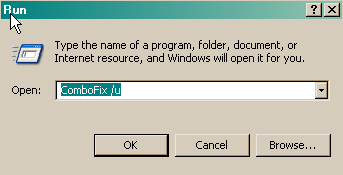
 Viewpoint is not on your computer. I included that in my post in error.
