This is a read-only archive of malwareremoval.com. No new posts or registrations. Privacy Page
Malware Removal Forums

Windows Automatic update won't star

11 min read

This thread's last reply is from March 25, 2009, 6:48 AM UTC. Software, malware, and removal-tool advice below may be out of date — treat specific steps and download links with caution.

This is not good news.

Let's try some other methods.

Please visit this page to download and run Combofix - http://www.bleepingcomputer.com/combofix/how-to-use-combofix

Save it to your desktop.

  • Double click on ComboFix.exe & follow the prompts.

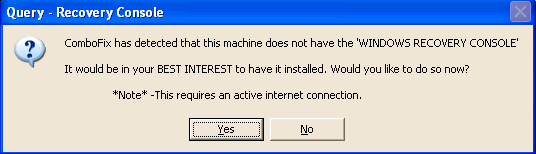
  • As part of its process, ComboFix will check to see if the Microsoft Windows Recovery Console is installed. You will see the following message if Microsoft Windows Recovery Console is not installed.


    With malware infections being as they are today, it's strongly recommended to have this pre-installed on your machine before doing any malware removal. It will allow you to boot up into a special recovery/repair mode that will allow us to more easily help you should your computer have a problem after an attempted removal of malware.

  • Follow the prompts to allow ComboFix to download and install the Microsoft Windows Recovery Console, and when prompted, agree to the End-User License Agreement to install the Microsoft Windows Recovery Console.


**Please note: If the Microsoft Windows Recovery Console is already installed, ComboFix will continue its malware removal procedures.

Once the Microsoft Windows Recovery Console is installed using ComboFix, you should see the following message:
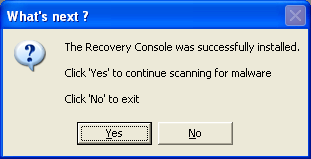


Click on Yes to continue scanning for malware.

When finished, a log will be produced. Please post this log in your next reply.

Do not mouse click on Combofix while it is running. That may cause it to stall.
I ran ComboFix and the Log file is attached

Attachments:

Hi Rob,

Have you installed SP3 before?
No, I haven't.
Hi Rob,

Please open Notepad and copy and paste the following in the Code box into Notepad.

http://malwareremoval.com/forum/viewtopic.php?f=11&t=39427&start=15

Suspect::
c:\windows\system32\drivers\65254764.sys


Click on File > Save As....

In the File Name field, copy and paste in CFScript.txt. Do not change the file name.

Click Save.

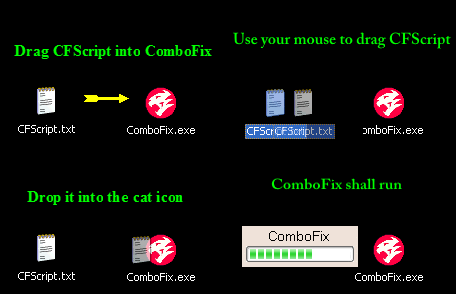
Referring to the picture below, drag CFScript into Combofix.


Combofix will start running. When done, a log will be produced. Please post this log in your next reply.

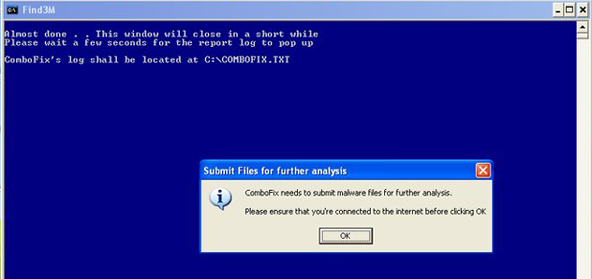
In addition, it will prompt you to submit some files for analyzing.


Click OK.

It will then start uploading the files automatically. Please do not close this window. It will close by itself when done.

Do not mouse click on Combofix while it is running. That may cause it to stall.
Hi,
Ran ComboFix again as suggested. Files were uploaded to Combo fix successfully. Log file is attached

Attachments:

Hi Rob,

Your log looks OK to me. There are no malware issues as far as I can see. There's one thing we can try, but we can't guarantee that it will help. You may end up having to reformat and re-install Windows.

Let me know if you want to proceed.
I'm willing to try the next step. I realize that I may have to format the hard drive and re-install.(I don't have any irretrievable data on this computer).
The suggestion is to try installing Windows XP SP3. But before that, two questions first (one of which is not going to be comfortable) :

1. Recall that I asked you to run Kaspersky scanner. How many times did you try to run this scanner?

2. Is your copy of Kaspersky Internet Security Suite legal?
I've already tried to install WindowsXP SP3, but I can't. I get directed to Windows Update site and have the same problem..nothing will download.
I tried running Kaspersky scanner at least twice, maybe three times.
And, yes my copy of Kaspersky Internet Security Suite 2009 is bought and paid for.
Hi Rob,

You will need another computer to download SP3, burn the setup file to a CD and install SP3 from there.
I've been unable to install SP3. The install just hangs up while "inspecting files", and never finishes (even after 1 hour of waiting)
Hi Rob,

I'm afraid I can't help you any further. There are no malware as far as I can see. As this is a malware removal forum, and we don't have a tech support forum here, I would recommend that you to these forums for help as that is their area of expertise. :)

Here are some forums that I would recommend:

Tech Support Forum
Bleeping Computer Forums
OK,will do. Thanks
As this current issue does not involve malware and therefore falls outside the scope of this forum, this topic is now closed.

You can help support this site from this link :
Donations For Malware Removal