This is a read-only archive of malwareremoval.com. No new posts or registrations. Privacy Page
Malware Removal Forums

Google Search Results take me to a different site.

24 min read

This thread's last reply is from March 14, 2009, 7:43 AM UTC. Software, malware, and removal-tool advice below may be out of date — treat specific steps and download links with caution.

Here you go, we will take it steady so don't worry pleased your asking :)
Disabled AntiVir thanks. Do you need me to run ESET again or will that log do?
That looks good, remember if you disabled your a\v to enable it back again.
Can you let me know how things are with the pc?
Dan,

The PC seems to be working ok. The problem with Google has stopped. AntiVar updates without problem.
The only thing that doesn't seem right are my slave hard drives. If you double click on them nothing happens.
If you right click I get the option to " Install or run program "
This may have nothing to do with the malware attack as it appeared after I reinstalled Vista ?

I forgot to mention I'm really grateful for your help


Angus
Hi Angus, I don't think this issue is malware related, I'd like just to have a look at a further scan to see if I can see anything regarding your issue.

Please download DDS from Tech Support Forum and save it to your desktop.

Double click on dds to run it. If you receive a UAC prompt, please allow it.

When done, DDS.txt will open. Another file, Attach.txt will open after a short while. Please save these 2 files to your desktop as they will be deleted once you close them.

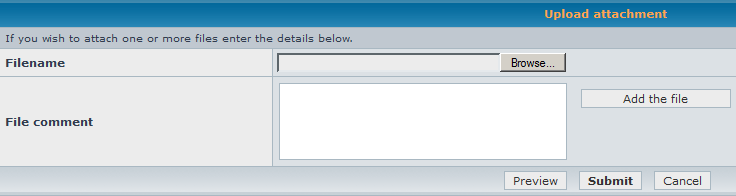
Please attach Attach.txt in your next reply by scrolling down to Upload attachment and clicking on Browse....

An image is below for your reference:


In your next reply, please post:

  1. DDS.txt
  2. Attach.txt (attached to this topic)
These ones ?

Attachments:

Hi, Angus just run this for me also.

Download and Run: RSIT

  • Download random's system information tool (RSIT) by random/random from here and save it to your desktop.
  • Double click on RSIT.exe to run RSIT.
  • Click Continue at the disclaimer screen.
  • Once it has finished, two logs will open. Please post the contents of both log.txt (<<will be maximized) and info.txt (<<will be minimized)


post both logs
Here you are

Attachments:

Looking at the logtext it would appear punkbuster is still there? I thought I'd uninstalled it .
Did you remove "PunkBuster Services" from add and remove programs? just want to make sure it could well be a leftover.
Dan,

Just checked. I have removed Punkbuster services. Must be a left over.

Angus
Run a windows search to see if it flags up any other locations for punkbuster.
Only flagged up 4 dll's in my local folder. I've deleted them
Just having a look in your event log to see if I can attribute anything to your hardware issue.goggling the code,
I found this thread here
Security Event Log Audit Failure 5038 in Vista SP1
Not sure it will help or is even your problem.

I will finish up with your log and I may have to direct you to a forum that there are experts in that field as I want you to get best advice.
Thanks Dan,

The main thing is the malware seems to be gone.
Is the last problem really a problem? As long as the computer works I'm happy.


Angus