
 Katana
I'm sorry, I intended to run Combofix again but forgot when the Kaspersky log was clean.
Please do the following ....
Download and Run ComboFix
Download a fresh copy of Combofix from here >>> ComboFix.exe
Custom CFScript
CAUTION: Do not mouse-click ComboFix's window while it is running. That may cause it to stall.
Note: the above code was created specifically for this user. If you are not this user, do NOT follow these directions as they could damage the workings of your system.
Please do the following ....
Download and Run ComboFix
Download a fresh copy of Combofix from here >>> ComboFix.exe
Custom CFScript
- Please open Notepad (Start -> Run -> type notepad in the Open field -> OK) and copy and paste the text present inside the code box below:
http://malwareremoval.com/forum/viewtopic.php?f=11&t=45214&p=466141#p466141

Suspect::

c:\windows\system32\drivers\cefo.sys

c:\windows\system32\drivers\dzttif.sys

File::

c:\windows\system32\drivers\cefo.sys

c:\windows\system32\drivers\dzttif.sys

Registry::

[HKLM\~\services\sharedaccess\parameters\firewallpolicy\standardprofile\AuthorizedApplications\List]

"c:\\Program Files\\uTorrent\\uTorrent.exe"=-


Driver::

nfaterc

qbjq

DDS::

mSearch Bar = hxxp://red.clientapps.yahoo.com/customi ... ch/ie.html

ADS::
- Save this as CFScript.txt and place it on your desktop.
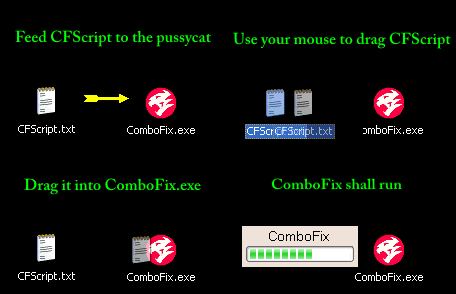
- Referring to the screenshot above, drag CFScript.txt into ComboFix.exe.
- ComboFix will now run a scan on your system. It may reboot your system when it finishes. This is normal.
- **Note**
When CF finishes running, the ComboFix log will open along with a message box--do not be alarmed. With the above script, ComboFix will capture files to submit for analysis.- Ensure you are connected to the internet and click OK on the message box.
- Copy and paste the contents of the log in your next reply.
CAUTION: Do not mouse-click ComboFix's window while it is running. That may cause it to stall.
Note: the above code was created specifically for this user. If you are not this user, do NOT follow these directions as they could damage the workings of your system.
