This is a read-only archive of malwareremoval.com. No new posts or registrations. Privacy Page
Malware Removal Forums

Phantom music and voices plus random IE windows opening...

89 min read

This thread's last reply is from September 11, 2009, 9:39 PM UTC. Software, malware, and removal-tool advice below may be out of date — treat specific steps and download links with caution.

"Edward" wrote:It was a misunderstanding on my part. I thought I had read an article that put it in a very poor light.


Well windows defender is not very good at all but looking at your logs it is not running so if it is not causing any problems i would leave it alone.

As of right now, it appears that my system is running fine.

"Edward" wrote:I am a little ticked with the IE Compatibility feature that has been added. I am now unable to post on several different forums of which I am a member. In addition, my Firefox browser will not allow me to sign in to one of the forums.


Do you mean IE compatibility in IE or Firefox? For the site you can not sign in, could you tell me sites name and have you cleared your cache and cookies?

"Edward" wrote:I appreciate the assistance you have given me. I am seriously thinking about signing up for your university. I just need to be sure 1. I don't have any further problems with my system and 2. I can commit the time necessary for the course.


We always need volunteers. If there is any questions you like to ask me then please feel free to ask.
It seems that the problem I am experiencing with IE Compatibility only exist on this web site when I attempt to post a reply. Right now, I am using Firefox to post this reply.

While using IE, if I try to post a reply, a small window pops up giving me a 'Compatibility' error. Then I am returned to the sign in screen.

I simply have resorted to using Firefox for most things. There are times when I have to us IE because Firefox gives me a problem with downloads. For instance, when trying to access the Combofix program, Firefox was not getting the job done. I had to use IE instead.
Hello!

I can give you few PC troubleshooting site and you can post there for help regarding these browser issues if you want.


Your log now appears to be clean. Congratulations!

You can get rid of the tools we used:
  • Javara - (You can just delete the exe file from your desktop)
  • ATF cleaner - (You can just delete the exe file from your desktop)


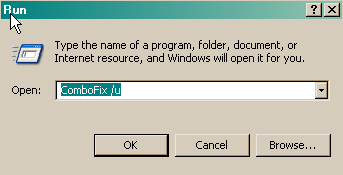
    Delete ComboFix and Clean Up
    Click Start > Run > type Combo-Fix /u > OK (Note the space between combofix and /u)

    Please advise if this step is missed for any reason as it performs some important actions.

    OTC

    Download OTC by Old Timer and save it to your Desktop.

    • Double-click OTC.exe
    • Click the CleanUp! button
    • Select Yes when the Begin cleanup Process? Prompt appears
    • If you are prompted to Reboot during the cleanup, select Yes
    • The tool will delete itself once it finishes, if not delete it by yourself


    Note: If you receive a warning from your firewall or other security programs regarding OTC attempting to contact the internet, please allow it to do so.

    General Security and Computer Health
    Below are some steps to follow in order to dramatically lower the chances of reinfection. You may have already implemented some of the steps below, however you should follow any steps that you have not already implemented.

  • Make sure that you keep your antivirus updated
    New viruses come out every minute, so it is essential that you have the latest signatures for your antivirus program to provide you with the best possible protection from malicious software.
    NOTE: You should only have one antivirus installed at a time. Having more than one antivirus program installed at once is likely to cause conflicts and may well decrease your overall protection as well as impairing the performance of your PC.
  • Security Updates for Windows, Internet Explorer & Microsoft Office
    Whenever a security problem in its software is found, Microsoft will usually create a patch so that after the patch is installed, attackers can't use the vulnerability to install malicious software on your PC. Keeping up with these patches will help to prevent malicious software being installed on your PC. Ensure you are registered for Windows updates via Start > right-click on My Computer > Properties > Automatic Updates tab or visit the Microsoft Update site on a regular basis.
    NOTE: The update process uses ActiveX, so you will need to use internet explorer for it and allow the ActiveX control to install.
  • Update Non-Microsoft Programs
    Microsoft isn't the only company whose products can contain security vulnerabilities. To check whether other programs running on your PC are in need of an update, you can use the Secunia Software Inspector or F-secure Health Check. I suggest that you run one of them at least once a month.


Recommended Programs

I would recommend the download and installation of some or all of the following programs (if not already present), and the updating of them on a regular basis.

  • WinPatrol
    As a robust security monitor, WinPatrol will alert you to hijackings, malware attacks and critical changes made to your computer without your permission. WinPatrol takes snapshot of your critical system resources and alerts you to any changes that may occur without your knowledge. For more information, please visit HERE.
  • SpywareBlaster
    SpywareBlaster sets killbits in the registry to prevent known malicious ActiveX controls from installing on your computer. If you don't know what ActiveX controls are, see HERE. You can download SpywareBlaster from HERE.
  • Malwarebytes' Anti-Malware
    Malwarebytes' Anti-Malware is an anti-malware application that can thoroughly remove even the most advanced malware. It includes a number of features, including a built in protection monitor that blocks malicious processes before they even start.You can download Malwarebytes' Anti-Malware from HERE. Here are two tutorials: Malwarebytes' Anti-Malware Setup Guide and Malwarebytes' Anti-Malware Scanning Guide.
  • Hosts File
    For added protection you may also like to add a host file. A simple explanation of what a Hosts file does is HERE and for more information regarding host files read HERE.
  • Use an alternative Internet Browser
    Many of the exploits are directed to users of Internet Explorer. Try using a different browser instead: Firefox or Opera or Google Chrome


Here is a great article by miekiemoes How to prevent Malware.

Finally I am trying to make one point very clear. It is ABSOLUTELY ESSENTIAL to keep all of your security programs up to date.


Please take the time to tell us what you would like to be done about the people who are behind all the problems you have had. We can only get something done about this if the people that we help, like you, are prepared to complain. We have a dedicated forum for collecting these complaints Malware Complaints. You need to be registered to post as, unfortunately, we were hit with too many spam posts to allow guest posting to continue. Just find your country room and register your complaint.


I'd be grateful if you could reply to this post so that I know you have read it and, if you've no other questions, the thread can be closed.

Happy surfing and stay clean!

Bio-Hazard
Good morning, afternoon or evening {which I'm guessing would be the proper salutation seeing as you are in the UK }

I will be following all the suggestions you have posted concerning:

Removal of software used to clean up my computer
Adding software to keep check on what is happening with my system
and
The creation of a host file.

I will also check out the sites you have mentioned for filing complaints.

Once again, thank you and hopefully, one day soon, I will return as a student.
As your problems appear to have been resolved,