This is a read-only archive of malwareremoval.com. No new posts or registrations. Privacy Page
Malware Removal Forums

Can someone read my log please ?

46 min read

This thread's last reply is from October 16, 2009, 3:58 PM UTC. Software, malware, and removal-tool advice below may be out of date — treat specific steps and download links with caution.

Hi Kim.
Thank you for your time,,I really appreciate it.

Your welcome :)

First please disable Avira as instructed previously.

Next.

ComboFix - CFScript
This script is for this user and computer ONLY! Using this tool incorrectly could cause problems with your operating system... preventing it from ever starting again!
You will not have Internet access when you execute ComboFix. All open windows will need to be closed!
  1. Please open Notepad and copy/paste all the text below... into the window:

    AWF::
    c:\hp\drivers\hplsbwatcher\bak
    c:\program files\Common Files\Symantec Shared\bak
    c:\program files\Common Files\Symantec Shared\Security Center\bak
    c:\program files\Hewlett-Packard\HP Boot Optimizer\bak
    c:\program files\HP\Digital Imaging\{33D6CC28-9F75-4d1b-A11D-98895B3A3729}\bak
    c:\program files\HP\HP Software Update\bak
    c:\program files\Panicware\Pop-Up Stopper Free Edition\bak
    c:\program files\Philips\Philips Device Manager\bin\bak
    c:\program files\Philips\Philips Lime Service\bin\bak
    c:\program files\QuickTime\bak
    c:\windows\system32\bak

    File::
    c:\windows\system32\drivers\lqezni.sys
    c:\windows\system32\sys64_nov.exe
    c:\documents and settings\HP_Owner\sys64_nov.exe
    c:\windows\system32\CustomEvents.dll
    c:\windows\aaceeg.tmp
    c:\windows\Tasks\At23.job
    c:\windows\system32\Event Agent\bin\smss .exe
    c:\windows\system32\Event Agent\Bin\spoolsv .exe
    c:\windows\system32\Event Agent\lsass .exe
    c:\windows\system32\Event Agent\Bin\services .exe

    Folder::
    c:\documents and settings\HP_Owner\Application Data\AVG8
    c:\program files\Coupons
    c:\documents and settings\All Users\Application Data\Symantec
    c:\program files\Common Files\Symantec Shared
    c:\program files\Symantec

    Driver::
    zgvldmpsnivf

    Registry::
    [HKEY_LOCAL_MACHINE\software\microsoft\windows nt\currentversion\winlogon\notify\Event Agent]
    "c:\windows\system32\CustomEvents.dll"=-
    [HKEY_CURRENT_USER\SOFTWARE\Microsoft\Windows\CurrentVersion\Run]
    "sys64_nov"=-
    [HKEY_LOCAL_MACHINE\SOFTWARE\Microsoft\Windows\CurrentVersion\Run]
    "sys64_nov"=-

    Firefox::
    c:\documents and settings\HP_Owner\Application Data\Mozilla\Firefox\Profiles\kbl8dbm6.default\extensions\[removed]

  2. Save it to your desktop as CFScript.txt
  3. Please disable any Antivirus or Firewall you have active, as shown in [url=http://www.bleepingcomputer.com/forums/topic114351.html:20w1xdx3]this topic. Please close all open application windows.
    *Only* when the 2 items above (Step 3) have been taken care of...
  4. Drag the CFScript.txt (icon) into the ComboFix.exe icon... as seen in the image below:
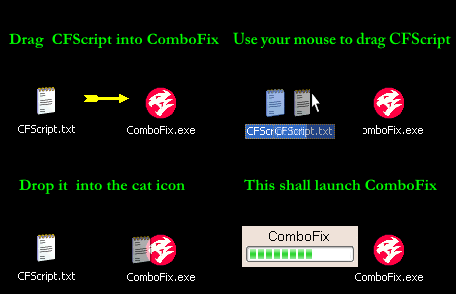
    This will cause ComboFix to run again.
    Do Not use your keyboard or mouse click anywhere in the ComboFix window, as this may cause the program to stall or crash.
    Do Not touch your computer when ComboFix is running!
  5. When finished ComboFix will create a log file... you can save this file to a convenient place.

Please copy/paste the ComboFix log file in your next reply.
** Enable your Antivirus and Firewall, before connecting to the Internet again! **

In your next reply.

1. ComboFix log.
Hi Cypher,
When I tried to drag the cfscript.txt to the combofix icon,something popped up that said that combofix had been compromised and I needed to download it again. (I believe it said it had been compromised with the Virulant virus,but I'm not positive,,I'm sorry I didn't take a screen cap of it)
I'm not sure what you want me to do,so I just clicked out of it till I hear from you. After I clicked out of it,,the combofix icon disappeared off my desktop. :?
I turned my antivirus back on,but I'm not going to do anything else to my computer till I hear from you.

Thanks,
Kim
Hi kim.
I will get back to you as soon as possible with another set of instructions.
Ok Cypher,,thanks :)
Hi kim, i have some really bad news :(

Your System is infected with Virut!!
Virut is a file infecting virus which is able to modify itself each and every time it runs. In addition, when it infects, sometimes it will destroy the file it tries to latch onto.
For these reasons, you really can't truly fix Virut.

More information:
http://free.avg.com/66558
There are bugs in the viral code. When the virus produces infected files, it also creates non-functional files that also contain the virus.

http://home.mcafee.com/VirusInfo/VirusProfile.aspx?key=143034
W32/Virut.h is a polymorphic, entry point obscuring (EPO) file infectorwith IRC bot functionality. It can accept commands to download other malware on the compromised machine.
It appends to the end of the last section of executable (PE) files an encrypted copy of its code. The decryptor is polymorphic and can be located either
Immediately before the encrypted code at the end of the last section
At the end of the code section of the infected host in 'slack-space' (assuming there is any)
At the original entry point of the host (overwriting the original host code)

Miekiemoes, an expert for malware removal, and an MS-MVP, additionally has a blog post about Virut.

I suggest you to start backup all of your valuable data/documents/pictures/movies/songs/etc..
Do NOT backup any applications/installers and Do NOT backup any .exe/.scr/.htm/.html/.xml/.zip/.rar files...
This because these files may be infected as well. If you back them up and replace them afterwards, it will infect your computer again.

If you have any questions feel free to ask.
Hi Cypher,
Well that sucks :( I was hoping we could get this fixed without reformatting and redownloading Windows. It looks like that's impossible.
So,,lemme ask you this,,I don't have my original Windows XP disk and passcode. So what would you suggest ? Would I need to buy Windows XP ?
As a side note,,I just bought a new laptop this weekend,and will be getting the Windows 7 upgrade on the 22nd when it comes out. Would I be able to use that disk on my infected computer,after I reformat ?

Also where do I backup my pictures,documents,etc ? Do you mean put them on a flashdrive ? And one more question,,can I continue to use my printer that's connected to that computer,after I reformat ?

Thank you so much for your help,
Kim
Thank you so much for your help.

Hi kim.
Your most welcome, sorry we were unable to clean your PC.
I don't have my original Windows XP disk and passcode. So what would you suggest ? Would I need to buy Windows XP ?

One option you may have is the HP system recovery if it is in stalled on your system.
You might be able to use it to Reformat your hard drive.

For information on how to do that see Here
I just bought a new laptop this weekend,and will be getting the Windows 7 upgrade on the 22nd when it comes out. Would I be able to use that disk on my infected computer,after I reformat ?

This is technically an illegal option, You need to purchase a legal copy of Windows for each PC you use.
Also where do I backup my pictures,documents,etc ? Do you mean put them on a flashdrive ?

You can backup them to a flashdrive or to a CD, just remember not to copy any .exe/.scr/.htm/.html/.xml/.zip/.rar files, Because these files may be infected as well and will infect your computer again.
Ok,,so I looked on the computer and there *is* something on the D drive that is labled "Hp Recovery". Is that what you mean ?
And another question,,I clicked on start-all programs-PC Help and Tools,,and there is a place there where I can make a recovery cd. Can I do that now ? Or would it be infected ?

Thanks for your help
Kim

Actually nevemind,,I can't do that,because my cd drive isn't working :/
Hi kim.

so I looked on the computer and there *is* something on the D drive that is labled "Hp Recovery". Is that what you mean ?

Yes you can use that if you have the Reformatting the hard drive option.
there is a place there where I can make a recovery cd. Can I do that now ? Or would it be infected ?

Yes unfortunately that would reinfect your PC.

Please let me know if you have any other questions, if not i can have this topic closed.

Thank you.
Hi Cypher,
I'll look and see if it has the reformatting option. Thank you for all your help,,I really appreciate it :)

Kim
Hi kim.
Your welcome :)
I will ask for this topic to be closed good luck.
As the resolution of this issue involves a reformat, and there have been no further questions posted regarding that process, this topic is now closed.

You can help support this site from this link:
Donations For Malware Removal