This is a read-only archive of malwareremoval.com. No new posts or registrations. Privacy Page
Malware Removal Forums

Dr Watson Post Mortem

67 min read

This thread's last reply is from May 30, 2010, 11:44 AM UTC. Software, malware, and removal-tool advice below may be out of date — treat specific steps and download links with caution.

I finally got the ESET scanner to run to completion. It found no threats. The system is still crashing just as much as before.

ESETSmartInstaller@High as CAB hook log:
OnlineScanner.ocx - registred OK
ESETSmartInstaller@High as downloader log:
all ok
esets_scanner_update returned -1 esets_gle=53251
ESETSmartInstaller@High as downloader log:
Can not open internetESETSmartInstaller@High as downloader log:
all ok
# version=7
# OnlineScannerApp.exe=1.0.0.1
# OnlineScanner.ocx=1.0.0.6211
# api_version=3.0.2
# EOSSerial=924661891ed077468086bfc5aa4a9a60
# end=finished
# remove_checked=false
# archives_checked=true
# unwanted_checked=true
# unsafe_checked=true
# antistealth_checked=true
# utc_time=2010-05-27 04:11:12
# local_time=2010-05-27 01:11:12 (+0900, Tokyo Standard Time)
# country="United Kingdom"
# lang=1033
# osver=5.1.2600 NT Service Pack 3
# compatibility_mode=512 16777215 100 0 0 0 0 0
# compatibility_mode=5891 16776533 100 100 0 14561146 0 0
# compatibility_mode=8192 67108863 100 0 115265 115265 0 0
# scanned=101291
# found=0
# cleaned=0
# scan_time=23095
Hi sakaya

SystemLook

Please download SystemLook from one of the links below and save it to your Desktop.
Download Mirror #1
Download Mirror #2

  • Double-click SystemLook.exe to run it.
  • Copy the content of the following codebox into the main textfield:
    :filefind
    lquinme.dll

  • Click the Look button to start the scan.
  • When finished, a notepad window will open with the results of the scan. Please post this log in your next reply.
Note: The log can also be found on your Desktop entitled SystemLook.txt
Hi Cypher. Thanks for the reply.

Here is the SystemLook log.

SystemLook v1.0 by jpshortstuff (11.01.10)
Log created at 18:06 on 27/05/2010 by User (Administrator - Elevation successful)

========== filefind ==========

Searching for "lquinme.dll"
C:\WINDOWS\system32\lquinme.dll --a--- 114176 bytes [14:32 09/08/2008] [12:00 14/04/2008] 2F01909CE0CDAFD482D128AF31238E71

-=End Of File=-
You're welcome sakaya.
Ok lets get this file tested.

Upload a File to Jotti

Please go to jotti.org

Copy/paste this file and path into the white box at the top:
C:\WINDOWS\system32\lquinme.dll

Press Submit - this will submit the file for testing.
Please wait for all the scanners to finish then copy and paste the results in your next response.

If you have trouble using jotti try Virustotal

Post back with the jotti or virustotal results.
I think we did this one already. Anyway, here are the results.

2010-05-25 Found nothing

2010-05-25 Found nothing

2010-05-25 Found nothing

2010-05-25 Found nothing

2010-05-25 Found nothing

2010-05-25 Found nothing

2010-05-25 Found nothing

2010-05-25 Found nothing

2010-05-25 Found nothing

2010-05-24 Found nothing

2010-05-25 Found nothing

2010-05-25 Found nothing

2010-05-25 Found nothing

2010-05-25 Found nothing

2010-05-25 Found nothing

(VBA 32) 2010-05-24 Crafted.Win32File.OLS

2010-05-24 Found nothing

2010-05-25 Found nothing

2010-05-25 Found nothing
Hi sakaya.
I think we did this one already.

No it was a different file we tested previously.
Ok lets run another scan.

Please download GMER Rootkit Scanner from Here.
  • Double click the .exe file. If asked to allow gmer.sys driver to load, please consent
  • If it gives you a warning about rootkit activity and asks if you want to run scan...click on NO
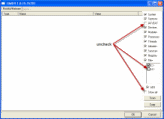
  • In the right panel, you will see several boxes that have been checked. Uncheck the following ...
    • IAT/EAT
    • Drives/Partition other than Systemdrive (typically C:\)
    • Show All << (don't miss this one)

    See image below, Click the image to enlarge it

  • Then click the Scan button & wait for it to finish
  • Once done click on the [Save..] button, and in the File name area, type in "Gmer.txt" or it will save as a .log file
  • Save it where you can easily find it, such as your desktop, and post it in your next reply
**Caution**
Rootkit scans often produce false positives. Do NOT take any action on any "<--- ROOKIT" entries

Note: Do not run any programs while Gmer is running.

Reply back with the Gmer.txt log.
lack of activity