This is a read-only archive of malwareremoval.com. No new posts or registrations. Privacy Page
Malware Removal Forums

Cinmus Trojan

91 min read

This thread's last reply is from August 1, 2010, 8:59 AM UTC. Software, malware, and removal-tool advice below may be out of date — treat specific steps and download links with caution.

Just bumping in case this has been forgotten. :)
Is turtledove dead?
Hi psychopiano.

Sorry about the delay. :oops:
Turtledove's computer decided to give up and I was knocked out with a stomach flu. Still not 100%.
I will try to answer you tomorrow night or Sunday morning.
OK. Here comes a some things that I have found in your logs and that needs to be answered or taken care of before going deeper.


TD already refered to our policy regarding P-2-P programs.
When going through your logs I found the following P-2-P programs that can all be removed as follows:


Uninstall Programs
  1. Click on Start...then... Click the Start Search box on the Start Menu.
  2. Copy and paste the value below, into the open text entry box:
    control appwiz.cpl
      Depending on your current view setting ...
    • Double click on Programs and Features.
    • Under Programs, click on Uninstall a program.
  3. Locate the following program(s) one at the time:
    BitComet 1.17
    PPTV V2.4.2.0013
    StreamTorrent 1.0
    StreamTorrent 1.0
    UUSee ²¥·Å²å¼þ»ù´¡°ü 4.8.306.18
    UUSee ÍøÂçµçÊÓ [4.8.307.11]
  4. Select the program and click on Uninstall to uninstall it.
  5. Repeat steps 3 - 4 for each program in the list.
  6. Not related to P-2-P: Have you purposely installed lockerzptz Toolbar or Lockerz_Wave_Updater? or Freecorder Toolbar? If not then repeat steps 3 - 4 for these as well.
  7. Process Lasso seems to be able to make all sorts of trouble on computers from what the comments about it shows. If it is not needed in order to run your computer I would remove that as well by following steps 3 - 4
  8. When finished... Close the Control Panel window.


Next lease download GMER Rootkit Scanner from Here.
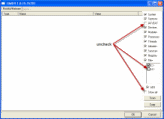
  • Right click the .exe file and chose Run as Administrator. If asked to allow gmer.sys driver to load, please consent.
  • If it gives you a warning about rootkit activity and asks if you want to run scan...click on NO
  • In the right panel, you will see several boxes that have been checked. Uncheck the following ...
    • IAT/EAT
    • Drives/Partition other than Systemdrive (typically C:\)
    • Show All << (don't miss this one)

    See image below, Click the image to enlarge it


  • Then click the Scan button & wait for it to finish
  • Once done click on the [Save..] button, and in the File name area, type in "Gmer.txt" or it will save as a .log file
  • Save it where you can easily find it, such as your desktop, and post it in your next reply
**Caution**
Rootkit scans often produce false positives. Do NOT take any action on any "<--- ROOKIT" entries

Note: Do not run any programs while Gmer is running.


Please post the GMER log in the next post and
Let me know how your computer is behaving and what you see that you believe are signs of infections.

While you are doing that I will continue analyzing the logs I already have.
"Elrond" wrote:OK. Here comes a some things that I have found in your logs and that needs to be answered or taken care of before going deeper.


TD already refered to our policy regarding P-2-P programs.
When going through your logs I found the following P-2-P programs that can all be removed as follows:


Uninstall Programs
  1. Click on Start...then... Click the Start Search box on the Start Menu.
  2. Copy and paste the value below, into the open text entry box:
    control appwiz.cpl
      Depending on your current view setting ...
    • Double click on Programs and Features.
    • Under Programs, click on Uninstall a program.
  3. Locate the following program(s) one at the time:
    BitComet 1.17
    PPTV V2.4.2.0013
    StreamTorrent 1.0
    StreamTorrent 1.0
    UUSee ²¥·Å²å¼þ»ù´¡°ü 4.8.306.18
    UUSee ÍøÂçµçÊÓ [4.8.307.11]
  4. Select the program and click on Uninstall to uninstall it.
  5. Repeat steps 3 - 4 for each program in the list.
  6. Not related to P-2-P: Have you purposely installed lockerzptz Toolbar or Lockerz_Wave_Updater? or Freecorder Toolbar? If not then repeat steps 3 - 4 for these as well.
  7. Process Lasso seems to be able to make all sorts of trouble on computers from what the comments about it shows. If it is not needed in order to run your computer I would remove that as well by following steps 3 - 4
  8. When finished... Close the Control Panel window.


Next lease download GMER Rootkit Scanner from Here.
  • Right click the .exe file and chose Run as Administrator. If asked to allow gmer.sys driver to load, please consent.
  • If it gives you a warning about rootkit activity and asks if you want to run scan...click on NO
  • In the right panel, you will see several boxes that have been checked. Uncheck the following ...
    • IAT/EAT
    • Drives/Partition other than Systemdrive (typically C:\)
    • Show All << (don't miss this one)

    See image below, Click the image to enlarge it


  • Then click the Scan button & wait for it to finish
  • Once done click on the [Save..] button, and in the File name area, type in "Gmer.txt" or it will save as a .log file
  • Save it where you can easily find it, such as your desktop, and post it in your next reply
**Caution**
Rootkit scans often produce false positives. Do NOT take any action on any "<--- ROOKIT" entries

Note: Do not run any programs while Gmer is running.


Please post the GMER log in the next post and
Let me know how your computer is behaving and what you see that you believe are signs of infections.

While you are doing that I will continue analyzing the logs I already have.


When I run GMER.exe, I get a bluescreen error and my computer reboots. In any case, I should say that my computer doesn't seem to have any noticeable problems anymore. So I think it would be OK if you just continued reading the other logs and if you find anything else, then bump this thread. Thanks for the other help anyway, I think one of the other things solved the problem.
A quick question: there are certain signs that you use this computer for business. Let me know if that is so.
"Elrond" wrote:A quick question: there are certain signs that you use this computer for business. Let me know if that is so.


What are the signs? I don't use it for business for the record, though I do use it for some hobby-related photography which you could see on my website http://www.fcumania.co.uk.
First of all is the following path:
c:\users\Alastair\AppData\Roaming
The Roaming part is mostly seen in business settings.
Further more there are indications that the computer was set up as part of a larger number of computers in a way that is normally done by the IT department of a business.
I see that you are a Manchester United fan. I have had a warm spot for the team for many years already. :)
"Elrond" wrote:I see that you are a Manchester United fan. I have had a warm spot for the team for many years already. :)


Actually I'm a Chelsea fan, my photography is simply for a club closer to where I live.
I do not see anything dangerous in your logs.

However I would like to run the following:


Malwarebytes Anti-Malware:

  • Launch the application, Check for Updates >> Perform Quick Scan.
  • When the scan is complete, click OK, then Show Results to view the results.
  • Check all items except items in the C:\System Volume Information folder... and click Remove Selected.
    Note: If MBAM encounters a file that is difficult to remove, you will be presented with 1 of 2 prompts, click OK to either and let MBAM proceed with the disinfection process, if asked to restart the computer, please do so immediately. Failure to reboot will prevent MBAM from removing all the malware.
  • When completed, a log will open in Notepad. please copy and paste the log into your next reply.
  • The log can also be found here:
    C:\Documents and Settings\Username\Application Data\Malwarebytes\Malwarebytes' Anti-Malware\Logs\mbam-log-date (time).txt


Kaspersky online scan
Please go to http://www.kaspersky.com/kos/eng/partne ... bscan.html and perform an online antivirus scan.
  1. Read through the requirements and privacy statement and click on Accept button.
  2. It will start downloading and installing the scanner and virus definitions. You will be prompted to install an application from Kaspersky. Click Run.
  3. When the downloads have finished, click on Settings.
  4. Make sure these boxes are checked (ticked). If they are not, please tick them and click on the Save button:
        Spyware, Adware, Dialers, and other potentially dangerous programs
        Archives
        Mail databases
  5. Click on My Computer under Scan.
  6. Once the scan is complete, it will display the results. Click on View Scan Report.
  7. You will see a list of infected items there. Click on Save Report As....
  8. Save this report to a convenient place. Change the Files of type to Text file (.txt) before clicking on the Save button.
  9. Please post this log in your next reply.

This online http://i275.photobucket.com/albums/jj285/Bleeping/KAS/KAS9.gif will help explain how to use the aforementioned online scan.


Please let me see the logs from
MalwareBytes AntiMalware
Kaspersky Online Scan

and any problems that you see.
"Elrond" wrote:I do not see anything dangerous in your logs.

However I would like to run the following:


Malwarebytes Anti-Malware:

  • Launch the application, Check for Updates >> Perform Quick Scan.
  • When the scan is complete, click OK, then Show Results to view the results.
  • Check all items except items in the C:\System Volume Information folder... and click Remove Selected.
    Note: If MBAM encounters a file that is difficult to remove, you will be presented with 1 of 2 prompts, click OK to either and let MBAM proceed with the disinfection process, if asked to restart the computer, please do so immediately. Failure to reboot will prevent MBAM from removing all the malware.
  • When completed, a log will open in Notepad. please copy and paste the log into your next reply.
  • The log can also be found here:
    C:\Documents and Settings\Username\Application Data\Malwarebytes\Malwarebytes' Anti-Malware\Logs\mbam-log-date (time).txt


Kaspersky online scan
Please go to http://www.kaspersky.com/kos/eng/partne ... bscan.html and perform an online antivirus scan.
  1. Read through the requirements and privacy statement and click on Accept button.
  2. It will start downloading and installing the scanner and virus definitions. You will be prompted to install an application from Kaspersky. Click Run.
  3. When the downloads have finished, click on Settings.
  4. Make sure these boxes are checked (ticked). If they are not, please tick them and click on the Save button:
        Spyware, Adware, Dialers, and other potentially dangerous programs
        Archives
        Mail databases
  5. Click on My Computer under Scan.
  6. Once the scan is complete, it will display the results. Click on View Scan Report.
  7. You will see a list of infected items there. Click on Save Report As....
  8. Save this report to a convenient place. Change the Files of type to Text file (.txt) before clicking on the Save button.
  9. Please post this log in your next reply.

This online http://i275.photobucket.com/albums/jj285/Bleeping/KAS/KAS9.gif will help explain how to use the aforementioned online scan.


Please let me see the logs from
MalwareBytes AntiMalware
Kaspersky Online Scan

and any problems that you see.


I'd just like to notify you that I won't have time to do these above, as I'm on holiday for the next week. I'll bump the thread after a week when I return, and complete your instructions. Thanks.
Hi. :)

I am now in turn am temporarily covering for my colleague turtledove as my other esteemed colleague Elrond is now unavailable himself.

With regard to the below request:-
"psychopiano" wrote:I'd just like to notify you that I won't have time to do these above, as I'm on holiday for the next week. I'll bump the thread after a week when I return, and complete your instructions. Thanks.
If you read my reply, please confirm for myself that the machine in question will not be used at all whist you are away? If not this kind of defeats the whole object of a malware removal process and it would be best to create a new topic and wait for a new helper upon your return.

Please let myself know about what I have asked, thank you.
lack of activity,