
 Gizzy
Gizzy
Hi rfeely,
FRST
Boot your computer into Recovery Environment
Please reply with:
FRST
- Download FRST64 to a USB flash drive.
- Plug the USB drive into the infected machine.
Boot your computer into Recovery Environment
- Restart the computer and press F8 repeatedly until the Advanced Options Menu appears.
- Select Repair your computer.
- Select Language and click Next
- Enter password (if necessary) and click OK, you should now see the screen below ...
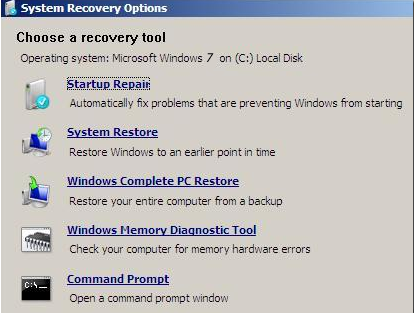
- Select the Command Prompt option.
- A command window will open.
- Type notepad then hit Enter.
- Notepad will open.
- Click File > Open then select Computer.
- Note down the drive letter for your USB Drive.
- Close Notepad.
- Back in the command window ....
- Type e:/frst64.exe and hit Enter (where e: is replaced by the drive letter for your USB drive)
- FRST will start to run.
- When the tool opens click Yes to disclaimer.
- Press Scan button.
- When finished scanning it will make a log FRST.txt on the flash drive.
- Close the command window.
- Boot back into normal mode and post me the FRST.txt log please.
Please reply with:
- FRST log
