This is a read-only archive of malwareremoval.com. No new posts or registrations. Privacy Page
Malware Removal Forums

.playbook.dollfield.eu pop-up

101 min read

This thread's last reply is from June 26, 2014, 2:28 PM UTC. Software, malware, and removal-tool advice below may be out of date — treat specific steps and download links with caution.

Hi chi-girl,

Please post the complete unedited ESET log as found here:
C:\Program Files\ESET\EsetOnlineScanner\log.txt.

Thank you,
wbg
Sorry about that. Here you go:

ESETSmartInstaller@High as downloader log:
all ok
# version=8
# OnlineScannerApp.exe=1.0.0.1
# OnlineScanner.ocx=1.0.0.7587
# api_version=3.0.2
# EOSSerial=67303e2bdbbfba4e80b091da4f8c57a6
# engine=18717
# end=finished
# remove_checked=false
# archives_checked=true
# unwanted_checked=true
# unsafe_checked=true
# antistealth_checked=true
# utc_time=2014-06-14 06:03:14
# local_time=2014-06-14 01:03:14 (-0600, Central Daylight Time)
# country="United States"
# lang=1033
# osver=6.1.7601 NT Service Pack 1
# compatibility_mode_1='avast! Antivirus'
# compatibility_mode=783 16777213 100 97 0 166271484 0 0
# compatibility_mode_1=''
# compatibility_mode=5893 16776573 100 94 0 154312444 0 0
# scanned=154272
# found=9
# cleaned=0
# scan_time=6775
sh=C25E453070C795849C94FCB0311ED1DDD4F7B74D ft=1 fh=a07ba6255bd749e6 vn="Win32/Toolbar.Conduit potentially unwanted application" ac=I fn="C:\Program Files (x86)\CheckPoint\Install\CUninstallerZA.exe"
sh=DF507CE26573850D2EF424E58C2793B3A64C3748 ft=1 fh=5bbafaa53f163c41 vn="Win32/Toolbar.Montiera.I potentially unwanted application" ac=I fn="C:\Program Files (x86)\CheckPoint\Install\zatb.exe"
sh=7B77873A0211C306F67940313071105E65D358CF ft=1 fh=da3ddadd50906f30 vn="Win32/PrcView potentially unsafe application" ac=I fn="C:\Users\a965051\Documents\Virus Fixes\SDFix.exe"
sh=B67F065F1DED1C7CC0CE5EB0C7EBA529F9519806 ft=1 fh=a38d602d8204dd4e vn="Win32/OpenCandy potentially unsafe application" ac=I fn="C:\Users\a965051\Downloads\AdvancedScantoPDFFree.exe"
sh=7A15C79C853E69FA508030C14B3E75E71969AC35 ft=1 fh=88dc58412df7aec2 vn="Win32/Toolbar.Conduit potentially unwanted application" ac=I fn="C:\Users\a965051\Downloads\zafwSetupWeb_110_000_057.exe"
sh=D8AA292CA5245B4E83DF1AC9C2BFC5667FBC5E37 ft=1 fh=693c691a1f6ad03b vn="Win32/Toolbar.Conduit potentially unwanted application" ac=I fn="C:\Users\a965051\Downloads\zafwSetupWeb_110_780_000.exe"
sh=D16A17B29933FE4B8ACB56A143E52D2618D2D787 ft=1 fh=ac6d0777368d8aab vn="Win32/Toolbar.Conduit potentially unwanted application" ac=I fn="C:\Users\a965051\Downloads\zafwSetupWeb_120_118_000.exe"
sh=FF6189C81427004A5A75C813206C8BB5201F7A55 ft=1 fh=f3346341465c9511 vn="Win32/Toolbar.Conduit potentially unwanted application" ac=I fn="C:\Users\a965051\Downloads\zafwSetupWeb_131_211_000.exe"
sh=FAEC9C07DDBCEF6B8FC9243DC4E01945EF42AA9D ft=1 fh=4b054aeef455a592 vn="Win32/Toolbar.Conduit potentially unwanted application" ac=I fn="C:\Users\a965051\Downloads\zaSetupWeb_101_101_000_en.exe"


Turned Avast back on.

Thanks!
Hi chi-girl,

One more time before we finish up I would like to ask: How your computer is behaving?

wbg
Hi,

It seems to be doing fine. No issues to report. I haven't seen the pop-up in a week and I have been using the computer regularly.

Thanks!
Hi chi-girl,

Here is an image showing Adobe update page with a piggy-back program from McAfee. The reason I am sharing this is that it appears that you may have missed some of these piggy-back add-ons when downloading and installing software or updates. Some of these are not so obvious or are added later during the installation process. Please be mindful as you click to continue.
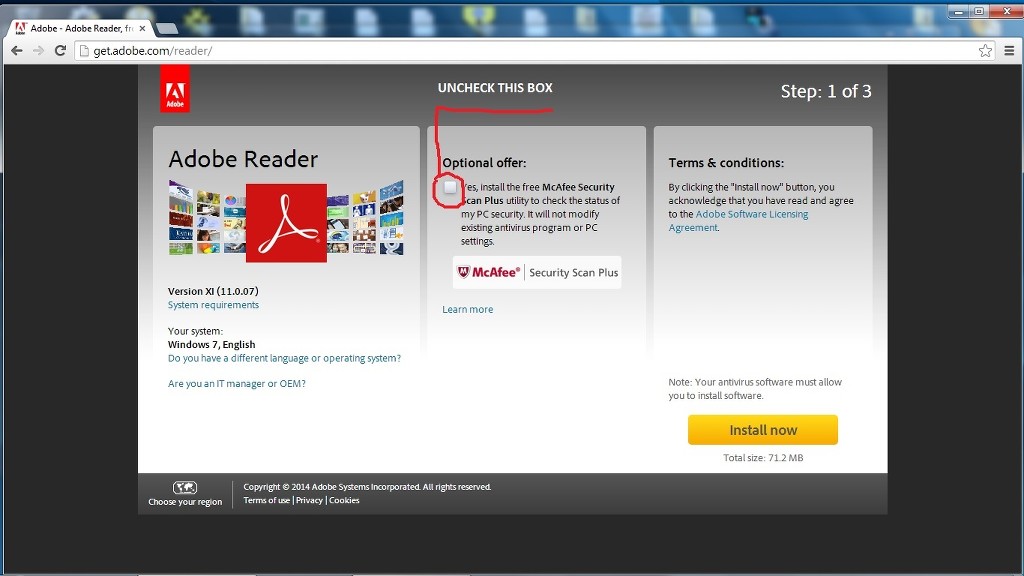

The files found by ESET appear to be parts of CheckPoint's ZoneAlarm. You may delete those if you no longer need them.


Your latest set of logs appear to be clean!

Now that you are clean, please follow these simple steps in order to keep your computer clean and secure:

Clean up with OTL

  • Right click on OTL.exe select "Run As Administrator" to run it. If prompted by UAC, please allow it.
    This will remove all the tools we used to clean your pc.
  • Close all other programs apart from OTL as this step will require a reboot
  • On the OTL main screen, press the CleanUp! button
  • Say Yes to the prompt and then allow the program to reboot your computer.


Remove all used tools not removed by OTL if they remain on your desktop.
DDS
ADWCleaner
JRT


Create a new, clean System Restore point which you can use in case of future system problems:
  • Press Start >> All Programs >> Accessories >>System Tools >> System Restore
  • Select Create a restore point, then Next, type a name like All Clean then press the Create button and once it's done press Close
  • Now remove old, infected System Restore points:
  • Next click Start >> Run and type cleanmgr in the box and press OK
  • Ensure the boxes for Recycle Bin, Temporary Files and Temporary Internet Files are checked, you can choose to check other boxes if you wish but they are not required.
  • Select the More Options tab, under System Restore press Clean up... and say Yes to the prompt
  • Press OK and Yes to confirm


Update your AntiVirus Software and keep your other programs up-to-date
Update your Antivirus programs and other security products regularly to avoid new threats that could infect your system.
You can use one of these sites to check if any updates are needed for your pc.
Secunia Personal Software Inspector (PSI)
F-secure Health Check

Security Updates for Windows, Internet Explorer & Microsoft Office
Whenever a security problem in its software is found, Microsoft will usually create a patch so that after the patch is installed, attackers can't use the vulnerability to install malicious software on your PC. Keeping up with these patches will help to prevent malicious software being installed on your PC. Ensure you are registered for Windows updates via Start > right-click on My Computer > Properties > Automatic Updates tab or visit the Microsoft Update site on a regular basis.

Install Malwarebytes' Anti-Malware - Malwarebytes' Anti-Malware is a new and powerful anti-malware tool. It is
totally free but for real-time protection you will have to pay a small one-time fee.

Update all these programs regularly - Make sure you update all the programs I have listed regularly. Without regular updates you WILL NOT be protected when new malicious programs are released.Follow this list and your potential for being infected again will reduce dramatically.

Here are some additional utilities that will enhance your safety


Also, please read this great article by Tony Klein So How Did I Get Infected In First Place

I would be grateful if you could reply to this post so that I know you have read it and, if you've no other questions, the thread can be closed.

Happy surfing and stay clean!
Hi,

I noticed two files in the ESET log that were not associated with Zone alarm.

sh=7B77873A0211C306F67940313071105E65D358CF ft=1 fh=da3ddadd50906f30 vn="Win32/PrcView potentially unsafe application" ac=I fn="C:\Users\a965051\Documents\Virus Fixes\SDFix.exe"
sh=B67F065F1DED1C7CC0CE5EB0C7EBA529F9519806 ft=1 fh=a38d602d8204dd4e vn="Win32/OpenCandy potentially unsafe application" ac=I fn="C:\Users\a965051\Downloads\AdvancedScantoPDFFree.exe"

I don't use either program and would like to delete the files. Is it a matter of finding the files and deleting them? (I can easily do that.) Or do they have to be removed a different way? I'd like to keep the Zone Alarm program. I do use that.

Before I complete the rest of the steps, I'll wait to hear back from you.

Thanks!
Hi chi-girl,

These should not be hard to find. The first one is located in this folder: C:\Users\a965051\Documents\Virus Fixes
C:\Users\a965051\Documents\Virus Fixes\SDFix.exe

The second is located in this one: C:\Users\a965051\Downloads
C:\Users\a965051\Downloads\AdvancedScantoPDFFree.exe

If you have any problems locating them, let me know and we can use OTL to remove them.

wbg
Hi,

I was able to delete the two files listed below.

I ran the OTL Clean-up part.

I'm having difficulty with the System Restore Point. I do the following: Press Start >> All Programs >> Accessories >>System Tools >> System Restore

Once I do that, it doesn't give me an option to create a new restore point. It only gives me an option to restore from a previously saved restore point. Am I missing something or doing something incorrectly?

Thanks!


Thanks,
Cindy
Hi you can close this thread.

I found an alternate way to create a system restore point.

Thanks for your help!
Cindy
Hi chi-girl,

Your welcome for all the help. Here is the proper procedure for making a restore point, I apologize for not getting it sooner.

Create a System Restore Point
  1. Click Start
  2. Right-click on Computer ... select Properties.
  3. In the left pane under Control Panel Home ... click System protection.
    If UAC prompts for an administrator password or approval, type the password or give your "permission to continue".
  4. Select System Protection ...then choose Create.
  5. In the System Restore dialog box, type a description for the restore point ... click Create, again.
    A window will pop up with "The Restore Point was created successfully" confirmation message.
  6. Click OK ...then close the System Restore dialog.