This is a read-only archive of malwareremoval.com. No new posts or registrations. Privacy Page
Malware Removal Forums

win32: Malware-gen

95 min read

This thread's last reply is from October 5, 2011, 11:23 AM UTC. Software, malware, and removal-tool advice below may be out of date — treat specific steps and download links with caution.

Hi Panthus,

How is the PC performing now?

I need to take a closer look at what Combofix quarantined. Please post the contents of C:\Qoobox\ComboFix-quarantined-files.txt.

Thanks,

diver79
computer seems to be better, havent noticed any of the previous symptoms, and avast hasnt picked anything up recently.

2011-09-20 17:50:26 . 2011-09-20 17:50:26 0 ----a-w- C:\Qoobox\Quarantine\catchme.txt
2011-09-17 09:25:55 . 2011-09-17 09:25:55 709,968 ----a-w- C:\Qoobox\Quarantine\C\Windows\isRS-000.tmp.vir
2011-09-17 09:07:22 . 2011-09-17 09:07:22 958 ----a-w- C:\Qoobox\Quarantine\Registry_backups\AddRemove-Shockwave.reg.dat
2011-09-17 09:07:22 . 2011-09-17 09:07:22 1,380 ----a-w- C:\Qoobox\Quarantine\Registry_backups\AddRemove-Adobe Shockwave Player.reg.dat
2011-09-17 09:03:41 . 2011-09-17 09:03:41 118 ----a-w- C:\Qoobox\Quarantine\Registry_backups\Wow6432Node-URLSearchHooks-{37483b40-c254-4a72-bda4-22ee90182c1e}.reg.dat
2011-09-17 08:34:55 . 2011-09-20 17:58:55 15,749 ----a-w- C:\Qoobox\Quarantine\Registry_backups\tcpip.reg
2011-09-17 08:03:22 . 2011-09-20 17:48:05 153 ----a-w- C:\Qoobox\Quarantine\catchme.log
2011-05-18 14:19:06 . 2011-09-06 16:58:22 7,075 ----a-w- C:\Qoobox\Quarantine\C\Users\Andrew\AppData\LocalLow\Sun\Java\Deployment\cache\6.0\16\402ee3d0-53f6e611.vir
2011-05-14 14:38:32 . 2011-05-14 14:38:32 9,071 ----a-w- C:\Qoobox\Quarantine\C\Users\Andrew\AppData\LocalLow\Sun\Java\Deployment\cache\6.0\14\7bea5a4e-23e3b59c.vir
2011-02-24 18:01:23 . 2011-09-06 16:58:26 4,558 ----a-w- C:\Qoobox\Quarantine\C\Users\Andrew\AppData\LocalLow\Sun\Java\Deployment\cache\6.0\27\7061701b-7bd6d4a8.vir
2010-08-24 12:48:18 . 2011-09-06 16:58:23 9,181 ----a-w- C:\Qoobox\Quarantine\C\Users\Andrew\AppData\LocalLow\Sun\Java\Deployment\cache\6.0\19\58aee313-367c8bc8.vir
2010-08-22 12:51:41 . 2011-09-06 16:58:25 7,903 ----a-w- C:\Qoobox\Quarantine\C\Users\Andrew\AppData\LocalLow\Sun\Java\Deployment\cache\6.0\24\28560c58-6be0feaa.vir
2010-07-06 16:40:00 . 2011-09-06 16:58:37 7,903 ----a-w- C:\Qoobox\Quarantine\C\Users\Andrew\AppData\LocalLow\Sun\Java\Deployment\cache\6.0\60\e8267fc-6187ac57.vir
2009-07-13 23:31:13 . 2009-07-14 01:39:46 31,744 ----a-w- C:\Qoobox\Quarantine\C\Windows\System32\consrv.dll.vir
2007-11-07 07:44:20 . 2007-11-07 07:44:20 855,040 ----a-w- C:\Qoobox\Quarantine\C\Install.exe.vir
2006-12-13 15:03:14 . 2006-12-13 15:03:14 74,240 ----a-w- C:\Qoobox\Quarantine\C\Windows\SysWOW64\zlibwapi.dll.vir
2000-12-06 13:01:52 . 2000-12-06 13:01:52 415,176 ----a-w- C:\Qoobox\Quarantine\C\Windows\SysWOW64\comct332.ocx.vir
Hi Panthus,

Combofix may have quarantined two legitimate files. Please follow the instructions below to scan them using an Online Scanner.

Upload file(s) to VirusTotal (VT) for an online scan. Click here.
  • Click on the Browse button or the white box beside it. A File Upload prompt will open.
  • Copy and paste the following file and its path to upload:
    C:\Qoobox\Quarantine\C\Windows\SysWOW64\zlibwapi.dll.vir
  • Press Open, then Send file. The file will be uploaded for testing.
  • If there is any indication or prompt that the file has been scanned before, please proceed to have the file rescanned or reanalyzed.
  • Please wait for all the scanners to finish, then copy and paste the result into Notepad and save it to a convenient place.
  • Repeat for
    C:\Qoobox\Quarantine\C\Windows\SysWOW64\comct332.ocx.vir
  • Post the results in your next response.


Alternatively, if VirusTotal is busy or inaccessible, you may try Jotti or VirScan (VS) with similar steps.

A result from either one of the above scanners would be sufficient.
used jotti as virus total wouldnt open,
short version found nothing in either file

[ArcaVir]
2011-09-26 Found nothing
[Frisk F-Prot Antivirus]
2011-09-26 Found nothing
[Avast! antivirus]
2011-09-26 Found nothing
[F-Secure Anti-Virus]
2011-09-26 Found nothing
[Grisoft AVG Anti-Virus]
2011-09-26 Found nothing
[G DATA]
2011-09-26 Found nothing
[Avira AntiVir]
2011-09-26 Found nothing
[Ikarus]
2011-09-26 Found nothing
[Softwin BitDefender]
2011-09-26 Found nothing
[Kaspersky Anti-Virus]
2011-09-26 Found nothing
[ClamAV]
2011-09-26 Found nothing
[Panda Antivirus]
2011-09-26 Found nothing
[CPsecure]
2011-09-26 Found nothing
[Quick Heal]
2011-09-26 Found nothing
[Dr.Web]
2011-09-26 Found nothing
[Sophos]
2011-09-26 Found nothing
[Emsisoft Anti-Malware]
2011-09-26 Found nothing
[VirusBlokAda VBA32]
2011-09-26 Found nothing
[ESET]
2011-09-26 Found nothing
[VirusBuster]
2011-09-26 Found nothing


Scanners
[ArcaVir]
2011-09-26 Found nothing
[Frisk F-Prot Antivirus]
2011-09-26 Found nothing
[Avast! antivirus]
2011-09-26 Found nothing
[F-Secure Anti-Virus]
2011-09-26 Found nothing
[Grisoft AVG Anti-Virus]
2011-09-26 Found nothing
[G DATA]
2011-09-26 Found nothing
[Avira AntiVir]
2011-09-26 Found nothing
[Ikarus]
2011-09-26 Found nothing
[Softwin BitDefender]
2011-09-26 Found nothing
[Kaspersky Anti-Virus]
2011-09-26 Found nothing
[ClamAV]
2011-09-26 Found nothing
[Panda Antivirus]
2011-09-26 Found nothing
[CPsecure]
2011-09-26 Found nothing
[Quick Heal]
2011-09-26 Found nothing
[Dr.Web]
2011-09-26 Found nothing
[Sophos]
2011-09-26 Found nothing
[Emsisoft Anti-Malware]
2011-09-26 Found nothing
[VirusBlokAda VBA32]
2011-09-26 Found nothing
[ESET]
2011-09-26 Found nothing
[VirusBuster]
2011-09-26 Found nothing
Hi Panthus.

Please follow the instructions below.

Upload files
  • Open Notepad. Copy and paste the following text into it:
    @echo off
    for %%g in (
    C:\Qoobox\Quarantine\C\Windows\SysWOW64\zlibwapi.dll.vir
    C:\Qoobox\Quarantine\C\Windows\SysWOW64\comct332.ocx.vir
    ) do zip Files_for_submission %%g
    del %0
  • Save it as grab.bat at the desktop. Make sure the Save as type: is All Files (*.*).
  • Double click on grab.bat to run it. Allow if prompted by any security software.
  • A file Files_for_submission.zip will appear on your desktop.
  • Please upload the zip file to this upload channel and follow the steps accordingly.


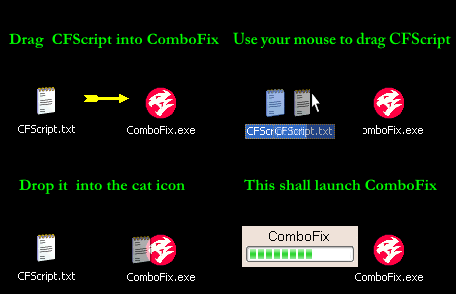
ComboFix - CFScript
This script is for this user and computer ONLY! Using this tool incorrectly could cause problems with your operating system... preventing it from ever starting again!

  1. Please open Notepad and copy/paste all of the text below... into the window:
     DeQuarantine::
    C:\Qoobox\Quarantine\C\Windows\SysWOW64\zlibwapi.dll.vir
    C:\Qoobox\Quarantine\C\Windows\SysWOW64\comct332.ocx.vir
    Quit::
  2. Save it to your desktop as CFScript.txt

    Disable Avast! Antivirus
    • Right- click on the avast! icon in system tray.
    • Select avast! shields control
    • Select the option to disable avast until the computer is restarted.

  3. Please close all open application windows.
  4. Drag the CFScript.txt (icon) into the ComboFix.exe icon... as seen in the image below:

    This will cause ComboFix to run again.
    Do Not use your keyboard or mouse click anywhere in the ComboFix window, as this may cause the program to stall or crash.
    Do Not touch your computer when ComboFix is running!
  5. When finished ComboFix will create a log file called DeQuarantine_log.txt.

Please copy/paste the DeQuarantine_log.txt log file in your next reply.
C:\Qoobox\Quarantine\C\Windows\SysWOW64\comct332.ocx.vir -> C:\Windows\SysWOW64\comct332.ocx
C:\Qoobox\Quarantine\C\Windows\SysWOW64\zlibwapi.dll.vir -> C:\Windows\SysWOW64\zlibwapi.dll
Hi Panthus,

Congratulations your PC is now free from infection 8) Follow the below steps to remove vulnerable programs and tighten your systems security.

Note: Earlier you made a backup of your system. This backup contains a copy of the infection. I would urge you to destroy this media to prevent re-infection.

Step 1 - ATF Cleaner
Please download ATF Cleaner to your desktop.
  • Right-click ATF-Cleaner.exe And select " Run as administrator " to run the program.
  • Under Main choose: Select All
  • Click the Empty Selected button.
If you use Firefox browser
  • Click Firefox at the top and choose: Select All
  • Click the Empty Selected button.
  • NOTE: If you would like to keep your saved passwords, please click No at the prompt.
If you use Opera browser
  • Click Opera at the top and choose: Select All
  • Click the Empty Selected button.
  • NOTE: If you would like to keep your saved passwords, please click No at the prompt.
Click Exit on the Main menu to close the program.
For Technical Support, double-click the e-mail address located at the bottom of each menu.


Step 2 - Remove Out of date Programs
The ZeroAccess infection you received takes advantage of known vulnerabilities in older versions of Java, Adobe Reader and Flash Player. It is highly recommended that you ensure there are no vulnerable/insecure programs installed on the Computer. This includes the above programs as well as others and most importantly Windows Update. See my note on Secunia below.
  • The following programs installed on your PC are out of date. Your computer would be at risk of getting reinfected with those outdated programs on board.
    Adobe Reader 9.4.5
  • Click on Start...then... Click the Search Programs and Files search box on the Start Menu.
  • Copy and paste the value below, into the open text entry box:
    appwiz.cpl
  • Locate the out of date program(s) above.
  • Select the program and click on Uninstall to uninstall it.
  • Repeat these steps for each program in the list. When finished... Close the Control Panel window.

Note: You can get the latest version of Adobe Reader here


Step 3 - Uninstall Combofix
  • Click on Start...then... Click the Search Programs and Files search box on the Start Menu.
  • Copy and paste the value below, into the open text entry box and press Enter:
    ComboFix /Uninstall
  • Note the space between the X and the /Uninstall, it needs to be there.

The above procedure will reset your System Restore and clear out the backups and quarantines created during the course of this fix.


Additional Security Tips.
Update your Antivirus programs and other programs regularly.
Secunia Personal Software Inspector - Copyright © Secunia. This app will monitor programs on your computer for known vulnerabilities. You can set it to auto-update for you, or just prompt you if an update is available. I highly recommend it.
F-secure Health Check - Copyright © F-Secure Corporation. F-Secure Health Check is a free application that tells you if your computer is protected and helps you fix possible security issues.

Microsoft Windows Update
Microsoft releases patches for Windows and Office products regularly to secure vulnerabilities and fix any bugs found. Install the updates immediately if they are found.
To update Windows
  • Go to Start > All Programs > Windows Update > Check for updates.

To update Office
  • Open up any Office program.
  • Go to Help > Check for Updates


Install additional (free) programs, that can help improve security.
Many feel that having a "layered" protection scheme is beneficial, you'll have to decide what works best for your situation.
Here are a few you can look into, if you want. :)

Malwarebytes' Anti-Malware
Its a good idea to get in the habit of running weekly scans with Malwarebytes. The free version does not have a realtime scanner, but if you want the extra protection it is worth paying for. Make sure you check for updates before running scans.
Download it from Malwarebytes © Malwarebytes Corporation.
Tutorials are available for installing and running, Malwarebytes' Anti-Malware.
Powerful, easy to use and free. For real-time protection you will have to purchase the product.

WinPatrol
Download it from Copyright © BillP Studios
Information about how WinPatrol works, is available Here.
(The free version of WinPatrol... provides limited real-time protection)

Read, stay informed.
To help minimize the chances of becoming re-infected, please read.
Computer Security - a short guide to staying safer online

If your computer is running slowly after your clean up, please read.
What to do if your Computer is running slowly

Please let me know that you completed the cleanup steps, and reviewed the rest of the post. Once I receive your reply, unless there are other malware questions or concerns, I will have this topic closed as resolved.
Hi, I am not currently at my computer and wont be able to complete this until this evening,
Thanks so much for all the help, I rely quite heavily on my laptop.
Cleanup complete, secunia and full version of malwarebytes installed.
Once again, many thanks for all the help :)
As this issue appears to be resolved,