
Hello, i'm linked to this site from an other forum  . So hi!
I was just watching videos on a site named ''dumpert.nl'' a Dutch populair video website. In all of a sudden a black screen popped op with a message in the upper left corner! I couldn't do anything! In about 20 seconds the normal windows view popped op and my whole right screen was filled with send messages from MSN. Many of them were not send but there are a few slipped through.
I've just build my new computer and have not visited any illegal or p0rn sites (yet )
)  .
.
I've ran a HJT scan and here is the log:
Logfile of Trend Micro HijackThis v2.0.2
Scan saved at 19:02:51, on 5-11-2008
Platform: Windows XP SP2 (WinNT 5.01.2600)
MSIE: Internet Explorer v6.00 SP2 (6.00.2900.2180)
Boot mode: Normal
Running processes:
C:\WINDOWS\System32\smss.exe
C:\WINDOWS\system32\winlogon.exe
C:\WINDOWS\system32\services.exe
C:\WINDOWS\system32\lsass.exe
C:\WINDOWS\system32\svchost.exe
C:\WINDOWS\System32\svchost.exe
C:\WINDOWS\system32\spoolsv.exe
C:\WINDOWS\Explorer.EXE
C:\Program Files\Java\jre1.6.0_07\bin\jusched.exe
C:\WINDOWS\RTHDCPL.EXE
C:\WINDOWS\system32\RUNDLL32.EXE
C:\Program Files\Logitech\GamePanel Software\G-series Software\LGDCore.exe
C:\Program Files\Logitech\GamePanel Software\LCD Manager\LCDMon.exe
C:\Program Files\Common Files\InstallShield\UpdateService\issch.exe
C:\WINDOWS\system32\ctfmon.exe
C:\Program Files\Logitech\GamePanel Software\LCD Manager\Applets\LCDPop3.exe
C:\Program Files\Logitech\GamePanel Software\LCD Manager\Applets\LCDClock.exe
C:\Program Files\Logitech\GamePanel Software\LCD Manager\Applets\LCDCountdown.exe
C:\Program Files\Logitech\GamePanel Software\LCD Manager\Applets\LCDMedia.exe
C:\Program Files\Internet Explorer\System32.exe
C:\Program Files\Xfire\xfire.exe
C:\WINDOWS\system32\libusbd-nt.exe
C:\Program Files\NVIDIA Corporation\nTune\nTuneService.exe
C:\WINDOWS\system32\nvsvc32.exe
C:\WINDOWS\system32\PnkBstrA.exe
C:\WINDOWS\system32\wuauclt.exe
C:\Program Files\MSN Messenger\usnsvc.exe
C:\Program Files\Rockstar Games\GTA San Andreas SA-MP\samp.exe
C:\PROGRA~1\AVG\AVG8\avgwdsvc.exe
C:\PROGRA~1\AVG\AVG8\avgrsx.exe
C:\PROGRA~1\AVG\AVG8\avgemc.exe
C:\Program Files\AVG\AVG8\avgtray.exe
C:\Program Files\AVG\AVG8\avgui.exe
C:\Program Files\AVG\AVG8\avgscanx.exe
C:\Program Files\Mozilla Firefox\firefox.exe
C:\WINDOWS\system32\NOTEPAD.EXE
C:\Program Files\Trend Micro\HijackThis\HijackThis.exe
R0 - HKCU\Software\Microsoft\Internet Explorer\Main,Start Page = http://search.bearshare.com/nl/
R0 - HKCU\Software\Microsoft\Internet Explorer\Toolbar,LinksFolderName = Koppelingen
O1 - Hosts: 66.98.148.65 auto.search.msn.com
O1 - Hosts: 66.98.148.65 auto.search.msn.es
O2 - BHO: My Global Search Bar BHO - {37B85A21-692B-4205-9CAD-2626E4993404} - C:\Program Files\MyGlobalSearch\bar\1.bin\MGSBAR.DLL
O2 - BHO: WormRadar.com IESiteBlocker.NavFilter - {3CA2F312-6F6E-4B53-A66E-4E65E497C8C0} - C:\Program Files\AVG\AVG8\avgssie.dll
O2 - BHO: SSVHelper Class - {761497BB-D6F0-462C-B6EB-D4DAF1D92D43} - C:\Program Files\Java\jre1.6.0_07\bin\ssv.dll
O2 - BHO: (no name) - {7E853D72-626A-48EC-A868-BA8D5E23E045} - (no file)
O2 - BHO: FlashFXP Helper for Internet Explorer - {E5A1691B-D188-4419-AD02-90002030B8EE} - C:\PROGRA~1\FlashFXP\IEFlash.dll
O3 - Toolbar: My Global Search Bar - {37B85A29-692B-4205-9CAD-2626E4993404} - C:\Program Files\MyGlobalSearch\bar\1.bin\MGSBAR.DLL
O4 - HKLM\..\Run: [NvCplDaemon] RUNDLL32.EXE C:\WINDOWS\system32\NvCpl.dll,NvStartup
O4 - HKLM\..\Run: [SunJavaUpdateSched] "C:\Program Files\Java\jre1.6.0_07\bin\jusched.exe"
O4 - HKLM\..\Run: [RTHDCPL] RTHDCPL.EXE
O4 - HKLM\..\Run: [nwiz] nwiz.exe /install
O4 - HKLM\..\Run: [NvMediaCenter] RUNDLL32.EXE C:\WINDOWS\system32\NvMcTray.dll,NvTaskbarInit
O4 - HKLM\..\Run: [Launch LGDCore] "C:\Program Files\Logitech\GamePanel Software\G-series Software\LGDCore.exe" /SHOWHIDE
O4 - HKLM\..\Run: [Launch LCDMon] "C:\Program Files\Logitech\GamePanel Software\LCD Manager\LCDMon.exe"
O4 - HKLM\..\Run: [KernelFaultCheck] %systemroot%\system32\dumprep 0 -k
O4 - HKLM\..\Run: [ISUSScheduler] "C:\Program Files\Common Files\InstallShield\UpdateService\issch.exe" -start
O4 - HKLM\..\Run: [ISUSPM Startup] C:\PROGRA~1\COMMON~1\INSTAL~1\UPDATE~1\ISUSPM.exe -startup
O4 - HKLM\..\Run: [EPGServiceTool] C:\PROGRA~1\WinTV\EPG Services\System\EPGClient.exe
O4 - HKLM\..\Run: [EasyTuneVI] C:\Program Files\GIGABYTE\ET6\ETcall.exe
O4 - HKLM\..\Run: [Alcmtr] ALCMTR.EXE
O4 - HKLM\..\Run: [AVG8_TRAY] C:\PROGRA~1\AVG\AVG8\avgtray.exe
O4 - HKCU\..\Run: [NVIDIA nTune] "C:\Program Files\NVIDIA Corporation\nTune\nTuneCmd.exe" clear
O4 - HKCU\..\Run: [CTFMON.EXE] C:\WINDOWS\system32\ctfmon.exe
O4 - HKCU\..\Run: [EVEREST AutoStart] C:\aap\Everest 4.60\everest.exe
O4 - HKCU\..\Run: [Instll] C:\Program Files\Internet Explorer\System32.exe
O4 - HKUS\S-1-5-19\..\Run: [CTFMON.EXE] C:\WINDOWS\System32\CTFMON.EXE (User 'Lokale service')
O4 - HKUS\S-1-5-20\..\Run: [CTFMON.EXE] C:\WINDOWS\System32\CTFMON.EXE (User 'Netwerkservice')
O4 - HKUS\S-1-5-18\..\Run: [CTFMON.EXE] C:\WINDOWS\System32\CTFMON.EXE (User 'SYSTEM')
O4 - HKUS\.DEFAULT\..\Run: [CTFMON.EXE] C:\WINDOWS\System32\CTFMON.EXE (User 'Default user')
O4 - Startup: Xfire.lnk = C:\Program Files\Xfire\xfire.exe
O4 - Global Startup: AutoStart IR.lnk = C:\Program Files\WinTV\Ir.exe
O9 - Extra button: (no name) - {08B0E5C0-4FCB-11CF-AAA5-00401C608501} - C:\Program Files\Java\jre1.6.0_07\bin\ssv.dll
O9 - Extra 'Tools' menuitem: Sun Java Console - {08B0E5C0-4FCB-11CF-AAA5-00401C608501} - C:\Program Files\Java\jre1.6.0_07\bin\ssv.dll
O9 - Extra button: Messenger - {FB5F1910-F110-11d2-BB9E-00C04F795683} - C:\Program Files\Messenger\msmsgs.exe
O9 - Extra 'Tools' menuitem: Windows Messenger - {FB5F1910-F110-11d2-BB9E-00C04F795683} - C:\Program Files\Messenger\msmsgs.exe
O16 - DPF: {D27CDB6E-AE6D-11CF-96B8-444553540000} (Shockwave Flash Object) - http://fpdownload.adobe.com/pub/shockwave/...ash/swflash.cab
O18 - Protocol: linkscanner - {F274614C-63F8-47D5-A4D1-FBDDE494F8D1} - C:\Program Files\AVG\AVG8\avgpp.dll
O20 - AppInit_DLLs: avgrsstx.dll
O23 - Service: AVG Free8 E-mail Scanner (avg8emc) - AVG Technologies CZ, s.r.o. - C:\PROGRA~1\AVG\AVG8\avgemc.exe
O23 - Service: AVG Free8 WatchDog (avg8wd) - AVG Technologies CZ, s.r.o. - C:\PROGRA~1\AVG\AVG8\avgwdsvc.exe
O23 - Service: EPGService - Hauppauge Computer Works - C:\PROGRA~1\WinTV\EPG Services\System\EPGService.exe
O23 - Service: GEST Service for program management. (GEST Service) - Unknown owner - C:\Program Files\GIGABYTE\EnergySaver\GSvr.exe
O23 - Service: InstallDriver Table Manager (IDriverT) - Macrovision Corporation - C:\Program Files\Common Files\InstallShield\Driver\11\Intel 32\IDriverT.exe
O23 - Service: LibUsb-Win32 - Daemon, Version 0.1.10.1 (libusbd) - http://libusb-win32.sourceforge.net - C:\WINDOWS\system32\libusbd-nt.exe
O23 - Service: nTune Service (nTuneService) - NVIDIA - C:\Program Files\NVIDIA Corporation\nTune\nTuneService.exe
O23 - Service: NVIDIA Display Driver Service (NVSvc) - NVIDIA Corporation - C:\WINDOWS\system32\nvsvc32.exe
O23 - Service: PnkBstrA - Unknown owner - C:\WINDOWS\system32\PnkBstrA.exe
--
End of file - 6688 bytes
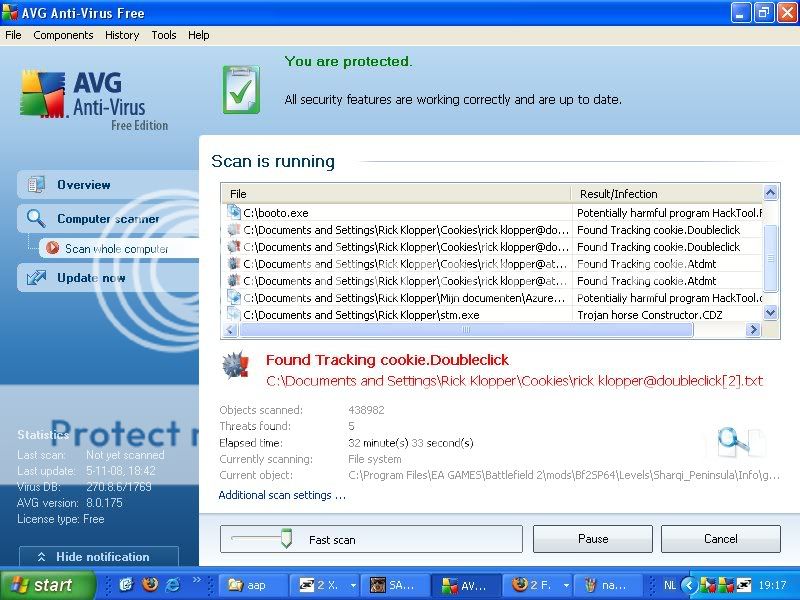
I've let AVG ran to and it found this:
Please help .
. So hi!I was just watching videos on a site named ''dumpert.nl'' a Dutch populair video website. In all of a sudden a black screen popped op with a message in the upper left corner! I couldn't do anything! In about 20 seconds the normal windows view popped op and my whole right screen was filled with send messages from MSN. Many of them were not send but there are a few slipped through.
I've just build my new computer and have not visited any illegal or p0rn sites (yet
) .I've ran a HJT scan and here is the log:
Logfile of Trend Micro HijackThis v2.0.2
Scan saved at 19:02:51, on 5-11-2008
Platform: Windows XP SP2 (WinNT 5.01.2600)
MSIE: Internet Explorer v6.00 SP2 (6.00.2900.2180)
Boot mode: Normal
Running processes:
C:\WINDOWS\System32\smss.exe
C:\WINDOWS\system32\winlogon.exe
C:\WINDOWS\system32\services.exe
C:\WINDOWS\system32\lsass.exe
C:\WINDOWS\system32\svchost.exe
C:\WINDOWS\System32\svchost.exe
C:\WINDOWS\system32\spoolsv.exe
C:\WINDOWS\Explorer.EXE
C:\Program Files\Java\jre1.6.0_07\bin\jusched.exe
C:\WINDOWS\RTHDCPL.EXE
C:\WINDOWS\system32\RUNDLL32.EXE
C:\Program Files\Logitech\GamePanel Software\G-series Software\LGDCore.exe
C:\Program Files\Logitech\GamePanel Software\LCD Manager\LCDMon.exe
C:\Program Files\Common Files\InstallShield\UpdateService\issch.exe
C:\WINDOWS\system32\ctfmon.exe
C:\Program Files\Logitech\GamePanel Software\LCD Manager\Applets\LCDPop3.exe
C:\Program Files\Logitech\GamePanel Software\LCD Manager\Applets\LCDClock.exe
C:\Program Files\Logitech\GamePanel Software\LCD Manager\Applets\LCDCountdown.exe
C:\Program Files\Logitech\GamePanel Software\LCD Manager\Applets\LCDMedia.exe
C:\Program Files\Internet Explorer\System32.exe
C:\Program Files\Xfire\xfire.exe
C:\WINDOWS\system32\libusbd-nt.exe
C:\Program Files\NVIDIA Corporation\nTune\nTuneService.exe
C:\WINDOWS\system32\nvsvc32.exe
C:\WINDOWS\system32\PnkBstrA.exe
C:\WINDOWS\system32\wuauclt.exe
C:\Program Files\MSN Messenger\usnsvc.exe
C:\Program Files\Rockstar Games\GTA San Andreas SA-MP\samp.exe
C:\PROGRA~1\AVG\AVG8\avgwdsvc.exe
C:\PROGRA~1\AVG\AVG8\avgrsx.exe
C:\PROGRA~1\AVG\AVG8\avgemc.exe
C:\Program Files\AVG\AVG8\avgtray.exe
C:\Program Files\AVG\AVG8\avgui.exe
C:\Program Files\AVG\AVG8\avgscanx.exe
C:\Program Files\Mozilla Firefox\firefox.exe
C:\WINDOWS\system32\NOTEPAD.EXE
C:\Program Files\Trend Micro\HijackThis\HijackThis.exe
R0 - HKCU\Software\Microsoft\Internet Explorer\Main,Start Page = http://search.bearshare.com/nl/
R0 - HKCU\Software\Microsoft\Internet Explorer\Toolbar,LinksFolderName = Koppelingen
O1 - Hosts: 66.98.148.65 auto.search.msn.com
O1 - Hosts: 66.98.148.65 auto.search.msn.es
O2 - BHO: My Global Search Bar BHO - {37B85A21-692B-4205-9CAD-2626E4993404} - C:\Program Files\MyGlobalSearch\bar\1.bin\MGSBAR.DLL
O2 - BHO: WormRadar.com IESiteBlocker.NavFilter - {3CA2F312-6F6E-4B53-A66E-4E65E497C8C0} - C:\Program Files\AVG\AVG8\avgssie.dll
O2 - BHO: SSVHelper Class - {761497BB-D6F0-462C-B6EB-D4DAF1D92D43} - C:\Program Files\Java\jre1.6.0_07\bin\ssv.dll
O2 - BHO: (no name) - {7E853D72-626A-48EC-A868-BA8D5E23E045} - (no file)
O2 - BHO: FlashFXP Helper for Internet Explorer - {E5A1691B-D188-4419-AD02-90002030B8EE} - C:\PROGRA~1\FlashFXP\IEFlash.dll
O3 - Toolbar: My Global Search Bar - {37B85A29-692B-4205-9CAD-2626E4993404} - C:\Program Files\MyGlobalSearch\bar\1.bin\MGSBAR.DLL
O4 - HKLM\..\Run: [NvCplDaemon] RUNDLL32.EXE C:\WINDOWS\system32\NvCpl.dll,NvStartup
O4 - HKLM\..\Run: [SunJavaUpdateSched] "C:\Program Files\Java\jre1.6.0_07\bin\jusched.exe"
O4 - HKLM\..\Run: [RTHDCPL] RTHDCPL.EXE
O4 - HKLM\..\Run: [nwiz] nwiz.exe /install
O4 - HKLM\..\Run: [NvMediaCenter] RUNDLL32.EXE C:\WINDOWS\system32\NvMcTray.dll,NvTaskbarInit
O4 - HKLM\..\Run: [Launch LGDCore] "C:\Program Files\Logitech\GamePanel Software\G-series Software\LGDCore.exe" /SHOWHIDE
O4 - HKLM\..\Run: [Launch LCDMon] "C:\Program Files\Logitech\GamePanel Software\LCD Manager\LCDMon.exe"
O4 - HKLM\..\Run: [KernelFaultCheck] %systemroot%\system32\dumprep 0 -k
O4 - HKLM\..\Run: [ISUSScheduler] "C:\Program Files\Common Files\InstallShield\UpdateService\issch.exe" -start
O4 - HKLM\..\Run: [ISUSPM Startup] C:\PROGRA~1\COMMON~1\INSTAL~1\UPDATE~1\ISUSPM.exe -startup
O4 - HKLM\..\Run: [EPGServiceTool] C:\PROGRA~1\WinTV\EPG Services\System\EPGClient.exe
O4 - HKLM\..\Run: [EasyTuneVI] C:\Program Files\GIGABYTE\ET6\ETcall.exe
O4 - HKLM\..\Run: [Alcmtr] ALCMTR.EXE
O4 - HKLM\..\Run: [AVG8_TRAY] C:\PROGRA~1\AVG\AVG8\avgtray.exe
O4 - HKCU\..\Run: [NVIDIA nTune] "C:\Program Files\NVIDIA Corporation\nTune\nTuneCmd.exe" clear
O4 - HKCU\..\Run: [CTFMON.EXE] C:\WINDOWS\system32\ctfmon.exe
O4 - HKCU\..\Run: [EVEREST AutoStart] C:\aap\Everest 4.60\everest.exe
O4 - HKCU\..\Run: [Instll] C:\Program Files\Internet Explorer\System32.exe
O4 - HKUS\S-1-5-19\..\Run: [CTFMON.EXE] C:\WINDOWS\System32\CTFMON.EXE (User 'Lokale service')
O4 - HKUS\S-1-5-20\..\Run: [CTFMON.EXE] C:\WINDOWS\System32\CTFMON.EXE (User 'Netwerkservice')
O4 - HKUS\S-1-5-18\..\Run: [CTFMON.EXE] C:\WINDOWS\System32\CTFMON.EXE (User 'SYSTEM')
O4 - HKUS\.DEFAULT\..\Run: [CTFMON.EXE] C:\WINDOWS\System32\CTFMON.EXE (User 'Default user')
O4 - Startup: Xfire.lnk = C:\Program Files\Xfire\xfire.exe
O4 - Global Startup: AutoStart IR.lnk = C:\Program Files\WinTV\Ir.exe
O9 - Extra button: (no name) - {08B0E5C0-4FCB-11CF-AAA5-00401C608501} - C:\Program Files\Java\jre1.6.0_07\bin\ssv.dll
O9 - Extra 'Tools' menuitem: Sun Java Console - {08B0E5C0-4FCB-11CF-AAA5-00401C608501} - C:\Program Files\Java\jre1.6.0_07\bin\ssv.dll
O9 - Extra button: Messenger - {FB5F1910-F110-11d2-BB9E-00C04F795683} - C:\Program Files\Messenger\msmsgs.exe
O9 - Extra 'Tools' menuitem: Windows Messenger - {FB5F1910-F110-11d2-BB9E-00C04F795683} - C:\Program Files\Messenger\msmsgs.exe
O16 - DPF: {D27CDB6E-AE6D-11CF-96B8-444553540000} (Shockwave Flash Object) - http://fpdownload.adobe.com/pub/shockwave/...ash/swflash.cab
O18 - Protocol: linkscanner - {F274614C-63F8-47D5-A4D1-FBDDE494F8D1} - C:\Program Files\AVG\AVG8\avgpp.dll
O20 - AppInit_DLLs: avgrsstx.dll
O23 - Service: AVG Free8 E-mail Scanner (avg8emc) - AVG Technologies CZ, s.r.o. - C:\PROGRA~1\AVG\AVG8\avgemc.exe
O23 - Service: AVG Free8 WatchDog (avg8wd) - AVG Technologies CZ, s.r.o. - C:\PROGRA~1\AVG\AVG8\avgwdsvc.exe
O23 - Service: EPGService - Hauppauge Computer Works - C:\PROGRA~1\WinTV\EPG Services\System\EPGService.exe
O23 - Service: GEST Service for program management. (GEST Service) - Unknown owner - C:\Program Files\GIGABYTE\EnergySaver\GSvr.exe
O23 - Service: InstallDriver Table Manager (IDriverT) - Macrovision Corporation - C:\Program Files\Common Files\InstallShield\Driver\11\Intel 32\IDriverT.exe
O23 - Service: LibUsb-Win32 - Daemon, Version 0.1.10.1 (libusbd) - http://libusb-win32.sourceforge.net - C:\WINDOWS\system32\libusbd-nt.exe
O23 - Service: nTune Service (nTuneService) - NVIDIA - C:\Program Files\NVIDIA Corporation\nTune\nTuneService.exe
O23 - Service: NVIDIA Display Driver Service (NVSvc) - NVIDIA Corporation - C:\WINDOWS\system32\nvsvc32.exe
O23 - Service: PnkBstrA - Unknown owner - C:\WINDOWS\system32\PnkBstrA.exe
--
End of file - 6688 bytes
I've let AVG ran to and it found this:
Please help
.
