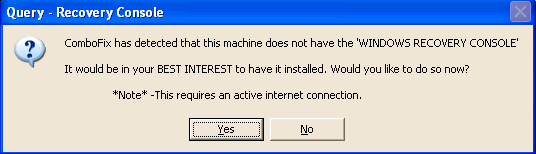
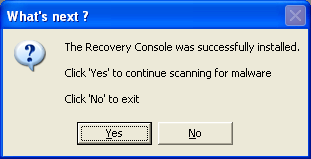
I requested help with the problem listed below and was told to rename the Hi Jack This file to something else then try to install it and post the report if it worked. This did work. The report follows my problem explanation.
Problem:
I really need some help and am hoping you can help me. My computer was working fine until Tuesday night early Wednesday morning. I had AVG anti virus program running on my computer. It was set to do it's daily scan. It always updates just before it does the scan. It couldn't update... said it couldn't get an internet connection. I was on the internet at the time and the internet seemed to be working fine. It said to go to avg.com website so I did. I can't go to the site. Everytime I try to go to the site a seperate browser would open with a button in the window to "Go to the website". I click on it and it does nothing. In the browser I was originally working in there was a page brought up that was a pharmacy website. I tried going onto the avg site on a different computer we have here and could get to the avg site on that computer. I did a search on Google for anti virus programs. No matter what site I went to it would not let me get into that site. We finally got ClamWin downloaded on a different computer and transferred to this one and installed it. It hit on some Trojans. I couldn't do anything on the computer though as it was froze up. I turned it off and rebooted it. When Windows came up it showed my desktop but the taskbar on the bottom of the screen would not load... no start button... no quick launch buttons... no taskbar on the right either. I tried to click on a folder on my desktop and it wouldn't do anything. I reboot the computer in safe mode and couldn't do anything that way either. I rebooted again and booted up in "The last known good configuration" It booted up good with everything appearing to be working. I went and deleted the programs affected according to the report from ClamWin with the Add/Remove Programs in the control panel. I then ran ClamWin again. There was a few programs that I had missed from the previous report. I deleted them in the same manor as the previous time. Restarted the computer in the normal fashion and all appreared to boot correctly except that my volume control will not show up in the taskbar even though it shows in the control panel feature for it to be loaded in the taskbar. I tried my browser and it was still not working right. I uninstalled my browser and reinstalled it. It is still not working right. I still can't access the avg website. The only way I could get to this website was through a proxy server. I have 2 different browsers on this computer... firefox and Opera and neither one is working. I downloaded the HiJackThis that was mentioned in the instructions for this website. I have tried to install it but can't. When I click it to install it I get a box that asks if I want to run the program or not. The options are run and cancel. I click run and that is as far as it will go. It will not install or do anything at that point. The box just disappears and nothing.
I don't know what is wrong with my computer but I sure hope you can help me get it working right again.
Thank you for your help with this matter.
Report from Hi Jack This:
Logfile of Trend Micro HijackThis v2.0.2
Scan saved at 6:43:42 PM, on 1/3/2009
Platform: Windows XP SP3 (WinNT 5.01.2600)
MSIE: Internet Explorer v6.00 SP3 (6.00.2900.5512)
Boot mode: Normal
Running processes:
C:\WINDOWS\System32\smss.exe
C:\WINDOWS\system32\winlogon.exe
C:\WINDOWS\system32\services.exe
C:\WINDOWS\system32\lsass.exe
C:\WINDOWS\system32\svchost.exe
C:\WINDOWS\System32\svchost.exe
C:\WINDOWS\system32\spoolsv.exe
C:\WINDOWS\Explorer.EXE
C:\Program Files\Common Files\Microsoft Shared\VS7DEBUG\mdm.exe
C:\WINDOWS\system32\hkcmd.exe
C:\Program Files\Analog Devices\Core\smax4pnp.exe
C:\Program Files\CyberLink\PowerDVD\PDVDServ.exe
C:\Program Files\Microsoft Office\Office12\GrooveMonitor.exe
C:\Program Files\Google\Gmail Notifier\gnotify.exe
C:\WINDOWS\TEMP\winlogin.exe
C:\Program Files\ClamWin\bin\ClamTray.exe
C:\WINDOWS\system32\rundll32.exe
C:\Program Files\Picasa2\PicasaMediaDetector.exe
C:\WINDOWS\system32\ctfmon.exe
C:\WINDOWS\system32\wscntfy.exe
C:\WINDOWS\system32\svchost.exe
C:\DOCUME~1\ADMINI~1\LOCALS~1\Temp\csrssc.exe
C:\Program Files\Trend Micro\HijackThis\HijackThis.exe
O4 - HKLM\..\Run: [IgfxTray] C:\WINDOWS\system32\igfxtray.exe
O4 - HKLM\..\Run: [HotKeysCmds] C:\WINDOWS\system32\hkcmd.exe
O4 - HKLM\..\Run: [SoundMAXPnP] C:\Program Files\Analog Devices\Core\smax4pnp.exe
O4 - HKLM\..\Run: [RemoteControl] "C:\Program Files\CyberLink\PowerDVD\PDVDServ.exe"
O4 - HKLM\..\Run: [LanguageShortcut] "C:\Program Files\CyberLink\PowerDVD\Language\Language.exe"
O4 - HKLM\..\Run: [GrooveMonitor] "C:\Program Files\Microsoft Office\Office12\GrooveMonitor.exe"
O4 - HKLM\..\Run: [{0228e555-4f9c-4e35-a3ec-b109a192b4c2}] C:\Program Files\Google\Gmail Notifier\gnotify.exe
O4 - HKLM\..\Run: [xsjfn83jkemfofght] C:\WINDOWS\TEMP\winlogin.exe
O4 - HKLM\..\Run: [ClamWin] "C:\Program Files\ClamWin\bin\ClamTray.exe" --logon
O4 - HKLM\..\Run: [fc1a4884] rundll32.exe "C:\WINDOWS\system32\cpihthvf.dll",b
O4 - HKCU\..\Run: [Picasa Media Detector] C:\Program Files\Picasa2\PicasaMediaDetector.exe
O4 - HKCU\..\Run: [ctfmon.exe] C:\WINDOWS\system32\ctfmon.exe
O4 - HKCU\..\Run: [svschost.exe] C:\WINDOWS\system32\svschost.exe -check
O4 - HKCU\..\Run: [79564575881868474970298275665593] C:\Program Files\Antivirus 2009\av2009.exe
O4 - HKCU\..\Run: [ieupdate] "C:\WINDOWS\system32\explorer32.exe"
O4 - HKCU\..\Run: [Jnskdfmf9eldfd] C:\DOCUME~1\ADMINI~1\LOCALS~1\Temp\csrssc.exe
O4 - HKCU\..\Run: [xsjfn83jkemfofght] C:\WINDOWS\TEMP\winlogin.exe
O4 - HKUS\S-1-5-18\..\Run: [MySpaceIM] C:\Program Files\MySpace\IM\MySpaceIM.exe (User 'SYSTEM')
O4 - HKUS\S-1-5-18\..\Run: [xsjfn83jkemfofght] C:\WINDOWS\TEMP\winlogin.exe (User 'SYSTEM')
O4 - HKUS\S-1-5-18\..\Run: [Jnskdfmf9eldfd] C:\WINDOWS\TEMP\csrssc.exe (User 'SYSTEM')
O4 - HKUS\.DEFAULT\..\Run: [MySpaceIM] C:\Program Files\MySpace\IM\MySpaceIM.exe (User 'Default user')
O4 - Startup: OneNote 2007 Screen Clipper and Launcher.lnk = C:\Program Files\Microsoft Office\Office12\ONENOTEM.EXE
O4 - Global Startup: OneNote 2007 Screen Clipper and Launcher.lnk = C:\Program Files\Microsoft Office\Office12\ONENOTEM.EXE
O7 - HKCU\Software\Microsoft\Windows\CurrentVersion\Policies\System, DisableRegedit=1
O8 - Extra context menu item: &Search - http://edits.mywebsearch.com/toolbaredits/menusearch.jhtml?p=ZUfox000
O8 - Extra context menu item: E&xport to Microsoft Excel - res://C:\PROGRA~1\MICROS~2\Office12\EXCEL.EXE/3000
O16 - DPF: {149E45D8-163E-4189-86FC-45022AB2B6C9} (SpinTop DRM Control) - file://C:\Program Files\Jigsaw Puzzle Platinum\Images\stg_drm.ocx
O16 - DPF: {CC450D71-CC90-424C-8638-1F2DBAC87A54} (ArmHelper Control) - file://C:\Program Files\Jigsaw Puzzle Platinum\Images\armhelper.ocx
O18 - Protocol: grooveLocalGWS - {88FED34C-F0CA-4636-A375-3CB6248B04CD} - C:\PROGRA~1\MICROS~2\Office12\GR99D3~1.DLL
O20 - AppInit_DLLs: cadjtm.dll,elpyxr.dll amjgjc.dll ovjrta.dll
O22 - SharedTaskScheduler: mcb7uehuj3n8weuhejsw - {C5BF49A2-94F3-42BD-F434-3604812C897D} - C:\WINDOWS\system32\jkse73hedfdgf.dll
O23 - Service: Google Updater Service (gusvc) - Google - C:\Program Files\Google\Common\Google Updater\GoogleUpdaterService.exe
O23 - Service: InstallDriver Table Manager (IDriverT) - Macrovision Corporation - C:\Program Files\Common Files\InstallShield\Driver\11\Intel 32\IDriverT.exe
--
End of file - 4365 bytes
Problem:
I really need some help and am hoping you can help me. My computer was working fine until Tuesday night early Wednesday morning. I had AVG anti virus program running on my computer. It was set to do it's daily scan. It always updates just before it does the scan. It couldn't update... said it couldn't get an internet connection. I was on the internet at the time and the internet seemed to be working fine. It said to go to avg.com website so I did. I can't go to the site. Everytime I try to go to the site a seperate browser would open with a button in the window to "Go to the website". I click on it and it does nothing. In the browser I was originally working in there was a page brought up that was a pharmacy website. I tried going onto the avg site on a different computer we have here and could get to the avg site on that computer. I did a search on Google for anti virus programs. No matter what site I went to it would not let me get into that site. We finally got ClamWin downloaded on a different computer and transferred to this one and installed it. It hit on some Trojans. I couldn't do anything on the computer though as it was froze up. I turned it off and rebooted it. When Windows came up it showed my desktop but the taskbar on the bottom of the screen would not load... no start button... no quick launch buttons... no taskbar on the right either. I tried to click on a folder on my desktop and it wouldn't do anything. I reboot the computer in safe mode and couldn't do anything that way either. I rebooted again and booted up in "The last known good configuration" It booted up good with everything appearing to be working. I went and deleted the programs affected according to the report from ClamWin with the Add/Remove Programs in the control panel. I then ran ClamWin again. There was a few programs that I had missed from the previous report. I deleted them in the same manor as the previous time. Restarted the computer in the normal fashion and all appreared to boot correctly except that my volume control will not show up in the taskbar even though it shows in the control panel feature for it to be loaded in the taskbar. I tried my browser and it was still not working right. I uninstalled my browser and reinstalled it. It is still not working right. I still can't access the avg website. The only way I could get to this website was through a proxy server. I have 2 different browsers on this computer... firefox and Opera and neither one is working. I downloaded the HiJackThis that was mentioned in the instructions for this website. I have tried to install it but can't. When I click it to install it I get a box that asks if I want to run the program or not. The options are run and cancel. I click run and that is as far as it will go. It will not install or do anything at that point. The box just disappears and nothing.
I don't know what is wrong with my computer but I sure hope you can help me get it working right again.
Thank you for your help with this matter.
Report from Hi Jack This:
Logfile of Trend Micro HijackThis v2.0.2
Scan saved at 6:43:42 PM, on 1/3/2009
Platform: Windows XP SP3 (WinNT 5.01.2600)
MSIE: Internet Explorer v6.00 SP3 (6.00.2900.5512)
Boot mode: Normal
Running processes:
C:\WINDOWS\System32\smss.exe
C:\WINDOWS\system32\winlogon.exe
C:\WINDOWS\system32\services.exe
C:\WINDOWS\system32\lsass.exe
C:\WINDOWS\system32\svchost.exe
C:\WINDOWS\System32\svchost.exe
C:\WINDOWS\system32\spoolsv.exe
C:\WINDOWS\Explorer.EXE
C:\Program Files\Common Files\Microsoft Shared\VS7DEBUG\mdm.exe
C:\WINDOWS\system32\hkcmd.exe
C:\Program Files\Analog Devices\Core\smax4pnp.exe
C:\Program Files\CyberLink\PowerDVD\PDVDServ.exe
C:\Program Files\Microsoft Office\Office12\GrooveMonitor.exe
C:\Program Files\Google\Gmail Notifier\gnotify.exe
C:\WINDOWS\TEMP\winlogin.exe
C:\Program Files\ClamWin\bin\ClamTray.exe
C:\WINDOWS\system32\rundll32.exe
C:\Program Files\Picasa2\PicasaMediaDetector.exe
C:\WINDOWS\system32\ctfmon.exe
C:\WINDOWS\system32\wscntfy.exe
C:\WINDOWS\system32\svchost.exe
C:\DOCUME~1\ADMINI~1\LOCALS~1\Temp\csrssc.exe
C:\Program Files\Trend Micro\HijackThis\HijackThis.exe
O4 - HKLM\..\Run: [IgfxTray] C:\WINDOWS\system32\igfxtray.exe
O4 - HKLM\..\Run: [HotKeysCmds] C:\WINDOWS\system32\hkcmd.exe
O4 - HKLM\..\Run: [SoundMAXPnP] C:\Program Files\Analog Devices\Core\smax4pnp.exe
O4 - HKLM\..\Run: [RemoteControl] "C:\Program Files\CyberLink\PowerDVD\PDVDServ.exe"
O4 - HKLM\..\Run: [LanguageShortcut] "C:\Program Files\CyberLink\PowerDVD\Language\Language.exe"
O4 - HKLM\..\Run: [GrooveMonitor] "C:\Program Files\Microsoft Office\Office12\GrooveMonitor.exe"
O4 - HKLM\..\Run: [{0228e555-4f9c-4e35-a3ec-b109a192b4c2}] C:\Program Files\Google\Gmail Notifier\gnotify.exe
O4 - HKLM\..\Run: [xsjfn83jkemfofght] C:\WINDOWS\TEMP\winlogin.exe
O4 - HKLM\..\Run: [ClamWin] "C:\Program Files\ClamWin\bin\ClamTray.exe" --logon
O4 - HKLM\..\Run: [fc1a4884] rundll32.exe "C:\WINDOWS\system32\cpihthvf.dll",b
O4 - HKCU\..\Run: [Picasa Media Detector] C:\Program Files\Picasa2\PicasaMediaDetector.exe
O4 - HKCU\..\Run: [ctfmon.exe] C:\WINDOWS\system32\ctfmon.exe
O4 - HKCU\..\Run: [svschost.exe] C:\WINDOWS\system32\svschost.exe -check
O4 - HKCU\..\Run: [79564575881868474970298275665593] C:\Program Files\Antivirus 2009\av2009.exe
O4 - HKCU\..\Run: [ieupdate] "C:\WINDOWS\system32\explorer32.exe"
O4 - HKCU\..\Run: [Jnskdfmf9eldfd] C:\DOCUME~1\ADMINI~1\LOCALS~1\Temp\csrssc.exe
O4 - HKCU\..\Run: [xsjfn83jkemfofght] C:\WINDOWS\TEMP\winlogin.exe
O4 - HKUS\S-1-5-18\..\Run: [MySpaceIM] C:\Program Files\MySpace\IM\MySpaceIM.exe (User 'SYSTEM')
O4 - HKUS\S-1-5-18\..\Run: [xsjfn83jkemfofght] C:\WINDOWS\TEMP\winlogin.exe (User 'SYSTEM')
O4 - HKUS\S-1-5-18\..\Run: [Jnskdfmf9eldfd] C:\WINDOWS\TEMP\csrssc.exe (User 'SYSTEM')
O4 - HKUS\.DEFAULT\..\Run: [MySpaceIM] C:\Program Files\MySpace\IM\MySpaceIM.exe (User 'Default user')
O4 - Startup: OneNote 2007 Screen Clipper and Launcher.lnk = C:\Program Files\Microsoft Office\Office12\ONENOTEM.EXE
O4 - Global Startup: OneNote 2007 Screen Clipper and Launcher.lnk = C:\Program Files\Microsoft Office\Office12\ONENOTEM.EXE
O7 - HKCU\Software\Microsoft\Windows\CurrentVersion\Policies\System, DisableRegedit=1
O8 - Extra context menu item: &Search - http://edits.mywebsearch.com/toolbaredits/menusearch.jhtml?p=ZUfox000
O8 - Extra context menu item: E&xport to Microsoft Excel - res://C:\PROGRA~1\MICROS~2\Office12\EXCEL.EXE/3000
O16 - DPF: {149E45D8-163E-4189-86FC-45022AB2B6C9} (SpinTop DRM Control) - file://C:\Program Files\Jigsaw Puzzle Platinum\Images\stg_drm.ocx
O16 - DPF: {CC450D71-CC90-424C-8638-1F2DBAC87A54} (ArmHelper Control) - file://C:\Program Files\Jigsaw Puzzle Platinum\Images\armhelper.ocx
O18 - Protocol: grooveLocalGWS - {88FED34C-F0CA-4636-A375-3CB6248B04CD} - C:\PROGRA~1\MICROS~2\Office12\GR99D3~1.DLL
O20 - AppInit_DLLs: cadjtm.dll,elpyxr.dll amjgjc.dll ovjrta.dll
O22 - SharedTaskScheduler: mcb7uehuj3n8weuhejsw - {C5BF49A2-94F3-42BD-F434-3604812C897D} - C:\WINDOWS\system32\jkse73hedfdgf.dll
O23 - Service: Google Updater Service (gusvc) - Google - C:\Program Files\Google\Common\Google Updater\GoogleUpdaterService.exe
O23 - Service: InstallDriver Table Manager (IDriverT) - Macrovision Corporation - C:\Program Files\Common Files\InstallShield\Driver\11\Intel 32\IDriverT.exe
--
End of file - 4365 bytes